

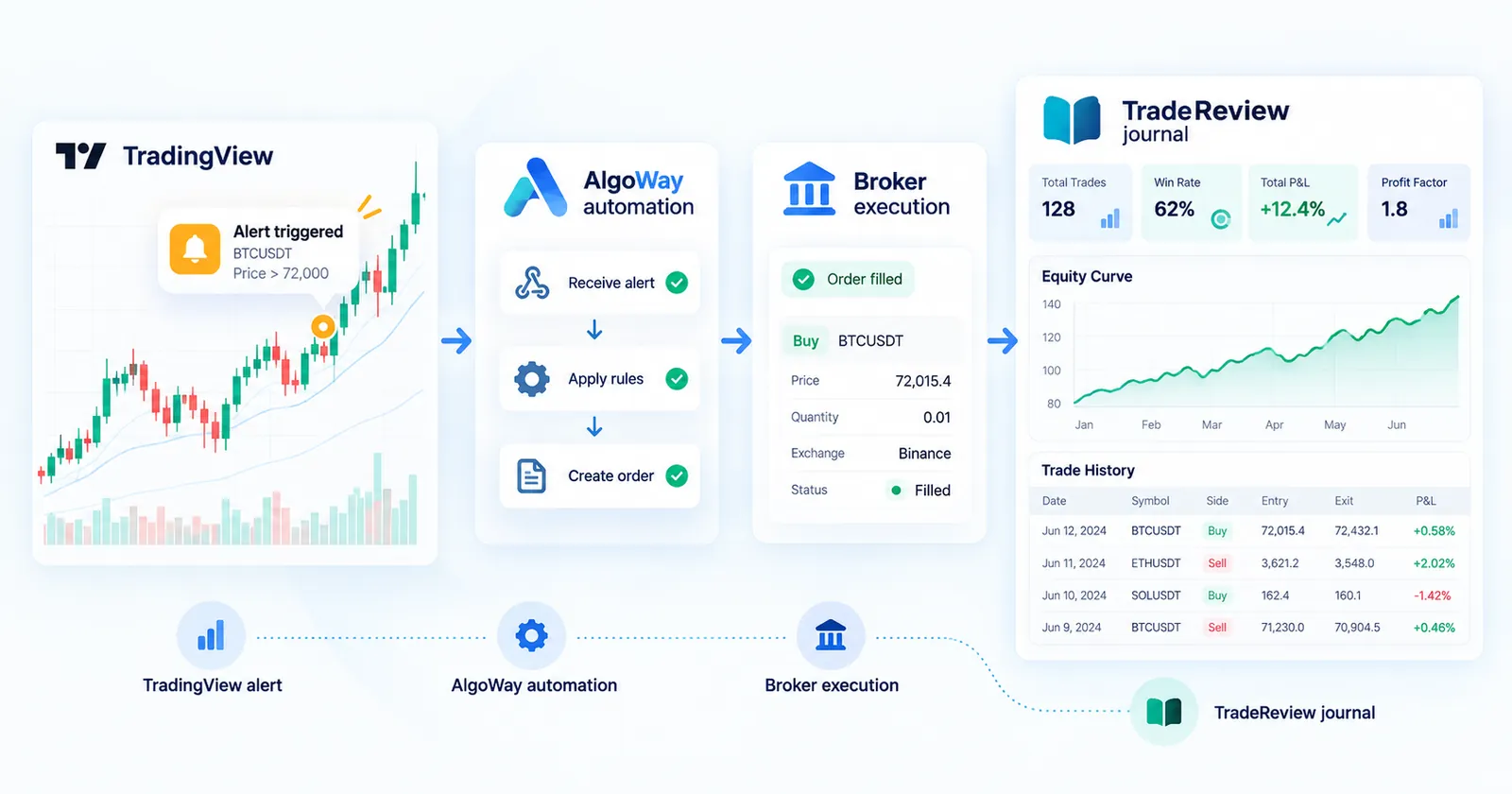
Guest post by AlgoWay, a tool that routes TradingView alerts to brokers and trading platforms.
A TradingView alert can feel like the start of an automated trading system. The chart prints a setup. The alert fires. A message leaves the platform. If you stop the story there, it sounds as if the trade already happened.
It did not.
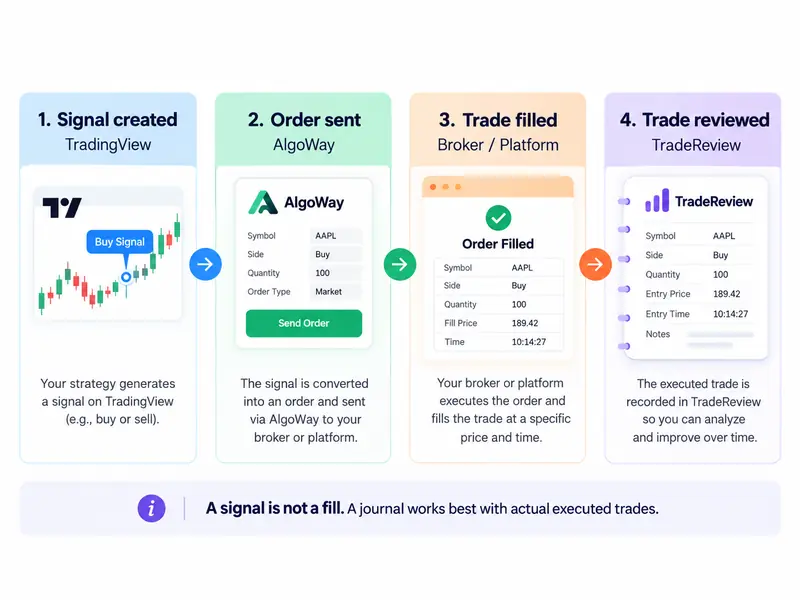
A signal is not an order. An order is not a fill. And a fill is not yet a review.
That distinction matters more than most traders expect. It affects how you troubleshoot delayed or duplicated trades, how you decide whether automation is actually helping, and how you build a trading journal that reflects real execution rather than good intentions.
This guide walks through the full chain from TradingView alert to broker execution and then into trade journaling. If you use TradingView for analysis, a bridge such as AlgoWay TradingView Automation for routing, and TradeReview for post-trade analysis, the pieces fit naturally — but only if you keep each stage separate.
Quick answer: what is TradingView automated trading?
TradingView automated trading usually means this workflow:
- A script, indicator, or strategy creates a signal in TradingView.
- That signal is sent out through an alert or webhook.
- An automation layer converts the message into an order format your broker or platform can accept.
- The broker or platform executes the order if market conditions allow.
- The executed trade is then reviewed in a trading journal.
The important part is that TradingView is usually the signal source, not the broker. In most setups, another tool handles routing and order translation, and the broker remains the place where the actual trade is filled.
The four stages traders should never mix up
If you automate from TradingView, you will make better decisions by separating the process into four stages.
1. Signal created
This is the chart event.
A Pine Script condition becomes true, a strategy order is simulated, or an alert message is sent. At this point, you have a trading instruction or intention. You do not yet have a broker fill.
This is where many traders make the first analytical mistake. They assume the chart event equals execution. It does not. A signal can arrive on time and still lead to a missed fill, a rejected order, or a filled trade at a different price.
2. Order sent
This is the automation stage.
A routing tool receives the TradingView alert, interprets the message, applies any rules or mappings, and creates an order for the destination account. In practice, this is the stage where ticker mapping, size conversion, stop-loss logic, and order-type formatting happen.
If something goes wrong here, the TradingView alert may be fine while the broker sees nothing useful.
3. Trade filled
This is the broker or platform stage.
The destination account accepts the order, rejects it, or leaves it pending depending on the order type and market conditions. Even if an automation layer sends the message correctly, execution still depends on the broker, exchange, or platform.
A fill also contains details the original signal may not: actual fill price, execution time, partial fills, and the final size that reached the market.
4. Trade reviewed
This is the journal stage.
Once a trade is actually executed, it becomes useful review material. A journal can then connect outcome, context, setup, timing, tags, and patterns across many trades.
This is where TradeReview fits best: not as a replacement for signal creation or execution, but as the place where executed trades become evidence.
Why this separation matters for journaling
A trading journal is meant to help you understand what happened, not what you hoped would happen.
If you journal signals instead of executed trades, your review can become misleading very quickly. A strong backtest alert might never have filled in the live market. A limit order may have stayed pending. A strategy might have generated two alerts while only one trade reached the account. A platform might have rejected the order because the symbol name, lot size, or order type was incompatible.
When a journal is built on real fills, those ambiguities shrink. You can review the price that was actually achieved, the side that was actually taken, and the time the trade actually entered or exited.
That is also why broker sync and broker-file import matter so much in a trading journal. TradeReview supports Auto Sync for five direct sources — cTrader, Alpaca, Interactive Brokers, MetaTrader 5, and TradeLocker — while other supported platforms can be brought in by file import, and the first file import is free. For traders who automate entries elsewhere, that keeps the review layer grounded in executed data rather than screenshots or memory.
Where AlgoWay fits in the chain
TradingView does not natively cover every broker workflow traders want. Many traders therefore use an automation layer between the alert and the execution venue.
That middle layer usually has to solve several practical problems:
- convert a TradingView alert into broker-specific order instructions
- map symbols between chart names and broker names
- convert sizing formats
- pass stop-loss and take-profit information
- send orders to the right account and platform
- handle different execution destinations from the same signal source
That is the job category where a tool like AlgoWay sits. It is not the charting platform and it is not the journal. It is the bridge that translates alerts from TradingView or other sources into executable orders across supported destinations.
For review purposes, this distinction is healthy. It means each layer can do one job well:
- TradingView creates or broadcasts the signal.
- AlgoWay routes and translates the order.
- Broker / platform executes the trade.
- TradeReview analyzes the outcome.
That architecture is much easier to troubleshoot than a vague idea of “the bot did something.”
A practical workflow: from alert to journal
Here is the cleanest way to think about the full process.
Step 1: Use TradingView to define the idea
This is where you build the logic, whether it comes from an indicator, a strategy, or a discretionary alert. Your focus here is signal quality and rule clarity.
Step 2: Use an automation layer to send the trade
Once the alert fires, the routing layer converts the message into the format required by the destination platform. This is where execution instructions become operational.
Step 3: Let the broker or platform create the real record
The account that receives the order produces the fill record. That record is what matters for post-trade analysis.
Step 4: Bring those executed trades into TradeReview
Now the journal starts paying for itself. Once trades are imported or synced, you can review performance by setup, side, market, time of day, or tags. You are no longer relying on a chart memory or an alert log. You are working from actual executions.
Common mistakes traders make with TradingView automation
Mistake 1: Treating an alert as proof of execution
An alert only proves that the chart condition was met and the alert event fired. It does not prove the order was accepted or filled.
Mistake 2: Reviewing strategy output instead of live fills
Backtests and simulated fills are useful for research — see how to backtest trading strategies. They are not a substitute for reviewing what the live account actually did.
Mistake 3: Blaming the wrong stage when something breaks
If a trade is missing, the problem could be in signal creation, routing, broker acceptance, or journal import. Those are different failure points and should be checked separately.
Mistake 4: Logging too late and too vaguely
If you wait too long, everything starts looking the same. A journal works better when the trade arrives with its execution details intact and you add context while the trade is still fresh.
Why this matters even more for active traders
The more trades you place, the more dangerous it becomes to rely on memory or a loose collection of screenshots.
A discretionary swing trader might survive with sparse notes for a while. A trader using TradingView alerts several times a day, across one or more platforms, usually cannot. Once automation enters the picture, the system produces enough activity that a proper review loop becomes necessary.
That is one of the strongest arguments for combining execution automation with a journal. Automation helps you place trades consistently. Journaling helps you understand whether that consistency is producing a real edge — the same reason every trader needs a trading journal.
Without the second part, automated trading can make you wrong faster.
What a good review loop looks like
The best review loop is not complicated.
After your trades are synced or imported into TradeReview, you can review them with questions like these:
- Which setup actually makes money after live execution?
- Does performance change by session, symbol, or market type?
- Are losing trades clustered around certain conditions?
- Is the issue signal quality, execution quality, or trade management?
- Do live fills behave differently from the backtest assumptions?
These are journal questions, not signal questions. They become much easier to answer once the data comes from actual broker records.
Who this workflow is best for
This TradingView → automation → broker → journal workflow is especially useful for traders who:
- use TradingView as their main charting and signal environment
- want execution in brokers or platforms outside TradingView itself
- need a clean separation between signal generation and performance review
- take enough trades that manual journaling becomes inconsistent
- want to compare the idea on the chart with what the market actually delivered
It also makes sense for traders who are still partly discretionary. You do not need a fully black-box system to benefit from this structure. Even a manual trader can use chart alerts for discipline, automation for execution, and a journal for review.
Final thought
TradingView automated trading is not one tool. It is a chain.
The chart creates the signal. The automation layer sends the instruction. The broker creates the fill. The journal turns that fill into feedback.
Keeping those roles separate is not just a technical detail. It is what allows you to diagnose problems correctly, review performance honestly, and improve faster.
If you already use TradingView for analysis and want your journal to reflect what actually reached the market, the best place to start is simple: journal the fill, not the idea.
FAQ
Does TradingView automated trading mean TradingView executes the trade itself?
Usually no. In many real-world setups, TradingView creates the alert while a separate automation layer routes the order to the broker or platform.
What is the difference between a signal and a fill?
A signal is the trading instruction or alert. A fill is the executed trade record created by the broker or platform once the order is actually executed.
Why should I journal executed trades instead of alerts?
Because executed trades reflect the real market outcome: actual price, time, size, and order result. Alerts alone can overstate what really happened.
How can I review trades that started in TradingView?
A common setup is to send the alert through an automation layer to a broker or platform, then sync or import the executed trades into a journal such as TradeReview.
Which brokers can TradeReview sync automatically?
TradeReview lists Auto Sync for cTrader, Alpaca, Interactive Brokers, MetaTrader 5, and TradeLocker. Other platforms on the supported brokers list can be brought in by file import, and manual logging remains available as well.
Related reading
- Auto import broker — how broker sync gets fills into your journal
- Supported brokerage — platforms you can sync or import from
- What is backtesting — why backtest results differ from live fills
- What is a trading journal — the fields worth logging on every trade
- Why every trader needs a trading journal — turn executed trades into feedback