Prop firm trading journal

A trading journal that tracks your prop firm rules

Prop mode checks your challenge against the firm's rules from your closed trades: how much you can still lose today, how far the max-loss floor is, and what is left to pass the phase. It is on every plan, Free included.

Plan
Every plan, Free too
Firm presets
6 firms, 20 programs
Other firms
Type the rules
Counts
Closed trades
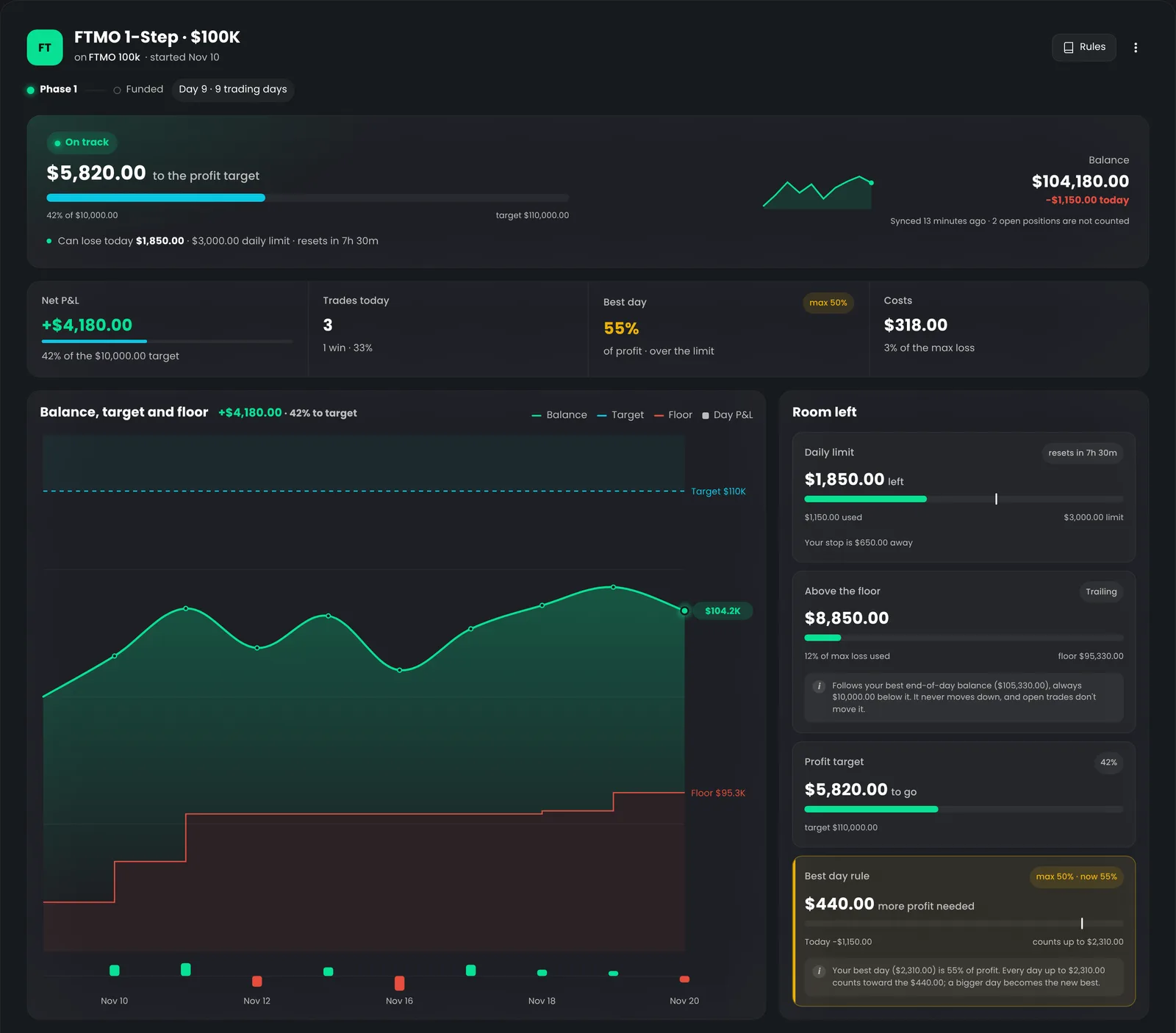
TradeReview Prop mode for an FTMO 1-Step $100K challenge: $5,820 to the profit target, $1,850 of the daily loss limit left, $8,850 above the trailing floor, and the best day at 55% of profit, over the 50% limit
Prop mode in the app. Sample account; your numbers come from your closed trades.

What does Prop mode track?

The rules that end challenges: the daily loss with the firm's reset time, a static or trailing max loss, the profit target, the minimum trading days and the best-day rule. Everything else in the journal stays the same.

Daily loss, on the firm's clock

The daily limit resets at the firm's time: midnight in Prague for FTMO, midnight UTC for FundedNext, midnight New York for Trade The Pool, 6 PM New York for Topstep and Apex. The dashboard shows how much you can still lose today and when the day resets.

Max loss: static or trailing

Static, trailing on the end-of-day balance, or trailing intraday, and a trailing floor that stops at the start balance where the firm says so. You always see how far the floor is.

Profit target and trading days

Progress to the target and the minimum trading days. When both are met and no limit is broken, it shows the phase as passed by the rules; the firm still confirms it.

Best-day (consistency) rule

How big your best day is as a share of total profit, how much more you can make today and stay inside the rule, and how much more profit is needed when a big day breaks it.

Pauses, phases and funded accounts

A daily limit that pauses the day instead of failing the account, the second phase of a 2-step challenge, and funded accounts without a target.

Your own daily stop

An optional stop below the firm's limit. The dashboard counts down to yours first. A separate panel compares your largest and average loss with the daily limit.

Which prop firms have presets?

Six firms come with their rules filled in, checked against each firm's site. For any other firm, choose Other firm and type the rules.

FirmProgramsRules checkedHow trades get in
FTMO1-Step, 2-Step, Instant17 Nov 2026MT5 or cTrader Auto Sync on Pro, or MetriX CSV
FundedNextStellar 1-Step, Stellar 2-Step, Stellar Instant15 Nov 2026MT5 or cTrader Auto Sync on Pro, or MT4 report
Hash Hedge1-Stage, 2-Stage, Instant17 Nov 2026.xlsx export from support
Trade The PoolFLEX Day, MAX Day, FLEX Swing17 Nov 2026Filled orders CSV
TopstepTrading Combine 50K, 100K/150K26 Nov 2026NinjaTrader, Tradovate or Quantower import (no TopstepX import yet)
Apex Trader FundingEOD and Intraday evaluations, 25K to 150K26 Nov 2026Rithmic (R Trader) or Tradovate import

The daily loss, max loss, targets and reward share of the FTMO, FundedNext, Hash Hedge and Trade The Pool programs are compared side by side on prop firm rules. File import is free for your first file, then on Basic.

Every attempt, on record

Failed challenges cost money. Prop mode keeps each one so the next attempt starts from what went wrong.

Past attempts

Each ended attempt is kept with its result (passed, failed or stopped), the fee, the payout and the trading days, with totals across attempts.

An attempt report

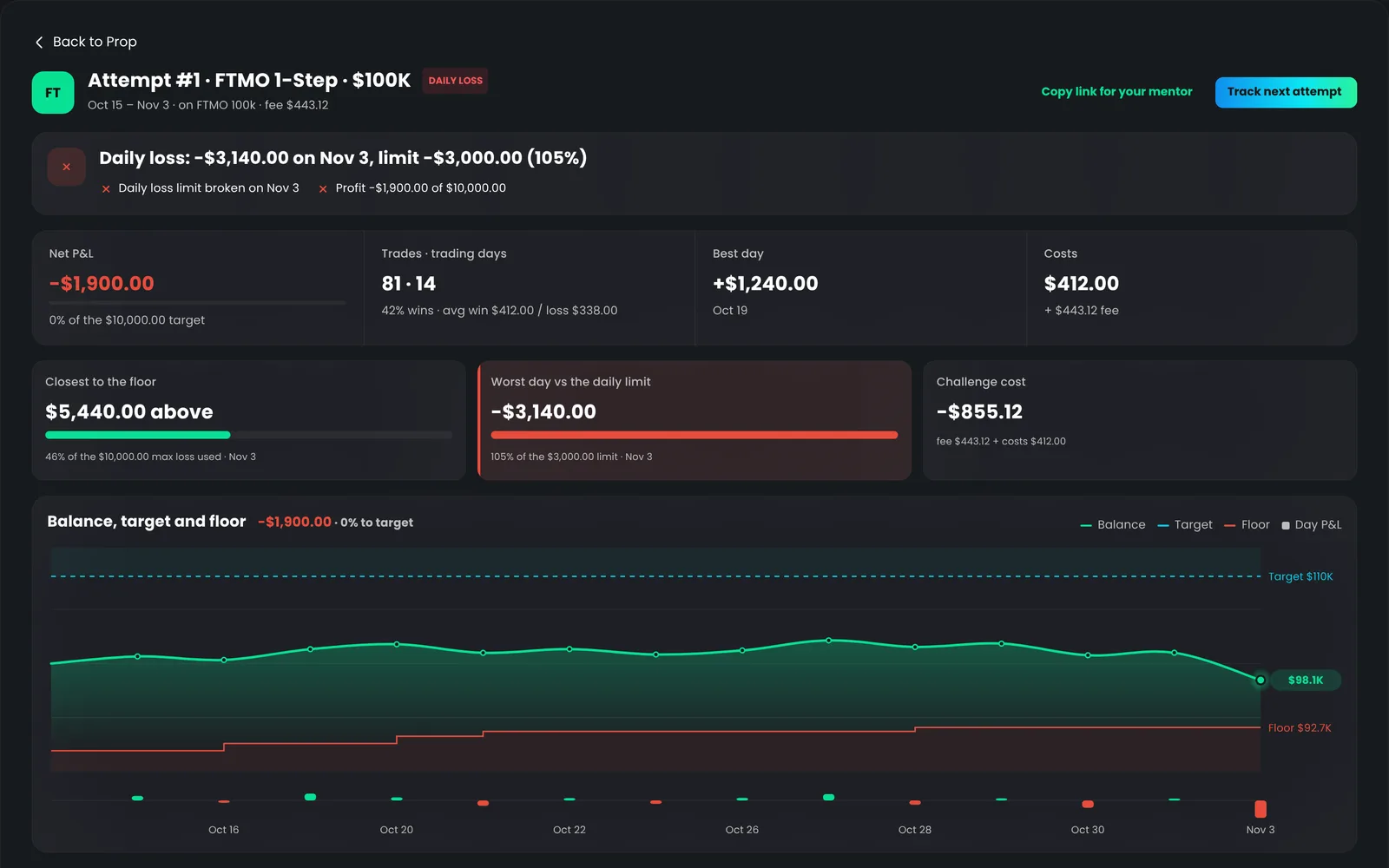
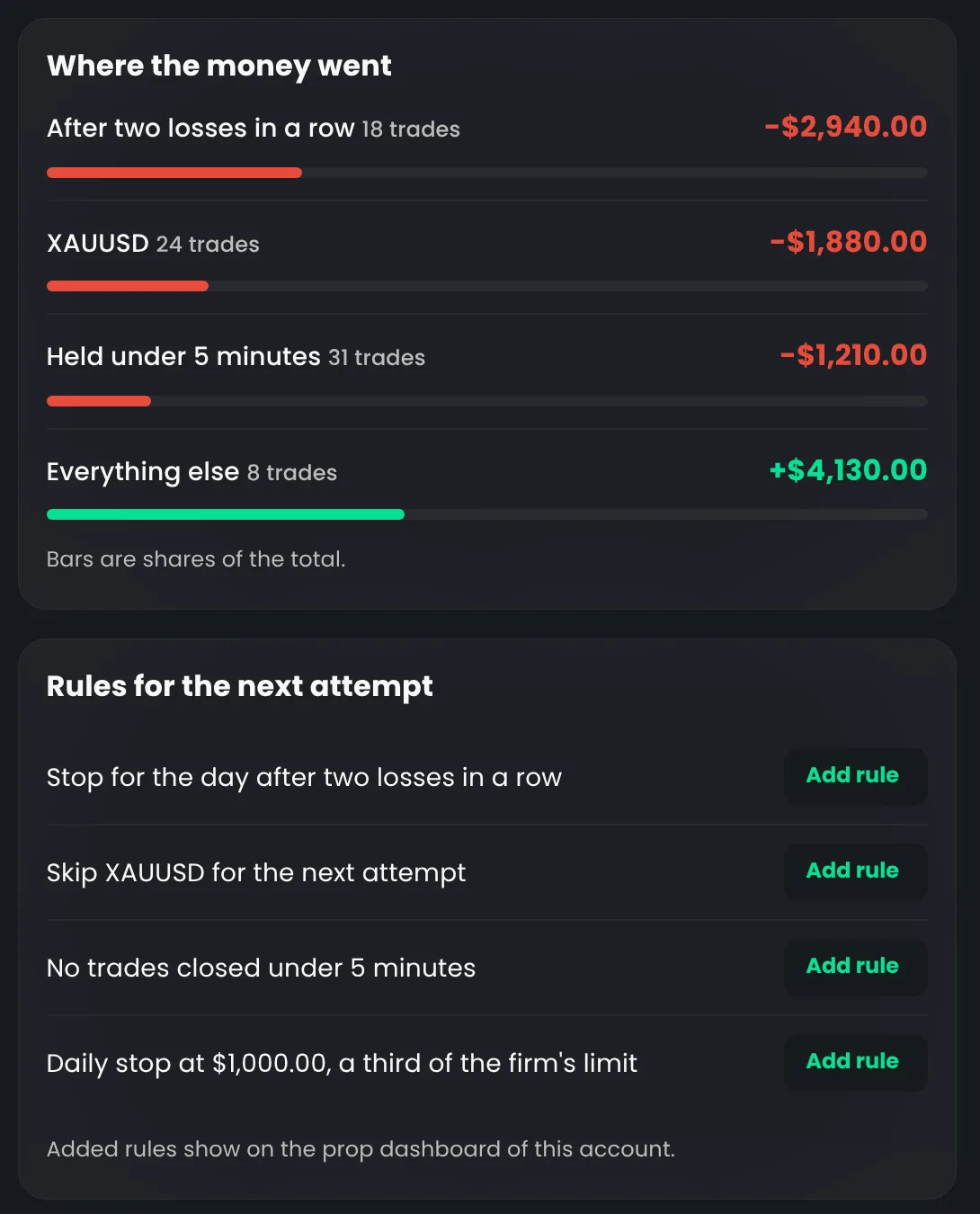
Where the money went (for example trades after two losses in a row, or one symbol), the closest you came to the floor, your worst day against the daily limit, and the return on the fee.

Rules for the next attempt

The report suggests rules such as stopping after two losses in a row or a daily stop at a third of the firm's limit. Rules you add show on the prop dashboard.

A link for your mentor

If you share your journal with a mentor (on Basic and Pro), copy a link to the report and they open it in your journal.

Attempt report for a failed FTMO 1-Step $100K challenge: daily loss of $3,140 on Nov 3 against a $3,000 limit, net P&L of -$1,900, closest to the floor at $5,440, and the balance chart
The report of a failed attempt: what broke, on which day, and how close the floor got.
Where the money went in that attempt (trades after two losses in a row, XAUUSD, trades held under 5 minutes) and suggested rules for the next attempt
Where the money went, and rules to add for the next attempt.

What Prop mode doesn't do

  • Prop mode counts closed trades. The firm also counts open positions, so while a trade is open its numbers can differ, and the firm's dashboard decides.
  • It doesn't place, block or close trades.
  • It only knows the trades in your journal, so keep the account synced or import the latest file.

Prop firm journal questions

Is Prop mode free?

Yes. Prop mode is on every plan, Free included. On Free you add trades by hand and your first broker file import is free; Auto Sync for MetaTrader 5 and cTrader is on Pro ($19.90/month).

Which prop firms does it have presets for?

FTMO, FundedNext, Hash Hedge, Trade The Pool, Topstep and Apex Trader Funding, with the rules checked against each firm's site. For any other firm, pick Other firm and type its daily loss, max loss and target. The rules for each firm are compared on prop firm rules.

Does it work for Topstep and Apex futures challenges?

Yes. Topstep's Trading Combine and Apex's EOD and Intraday evaluations have presets: the end-of-day or intraday trailing drawdown, the profit target, Apex's daily loss limit and Topstep's best-day rule, with the trading day ending at 6 PM New York. Import trades from NinjaTrader, Tradovate, Quantower or Rithmic; there is no TopstepX import yet.

Does it count open positions?

No. It counts closed trades. Firms such as FTMO count open profit and loss too, so while a trade is open the firm's numbers can differ from TradeReview's. The firm's dashboard is the one that decides.

What happens when I pass a phase?

Mark the phase as passed and pick the account for the next stage, since firms usually issue a new login. The attempt moves to your past attempts and you can track the next phase or the funded account.

Can I edit a firm's preset rules?

Yes. A challenge keeps the rules it started with, and you can edit them. The dashboard shows whether the rules are the firm's preset, edited by you, or typed in.

Can my mentor see my challenge?

Yes, if you share your journal with a mentor, which is on Basic and Pro. Each attempt report has a link you can copy for them, and it opens in your journal. See mentors.

Track your next challenge

Pick the account you trade the challenge on, choose the firm and program, and Prop mode counts your closed trades against its rules. Free plan included.

TradeReview is not affiliated with the prop firms named here. Trading involves risk; nothing here is financial advice.