MetaTrader 5 · Forex

MT5 trading journal for any MetaTrader 5 broker

One setup for every MT5 broker: let Auto Sync pull closed trades from the terminal every hour, or export one HTML report and upload it. 459 brokers confirmed, and the steps are the same for the ones we haven't listed yet.

Does my MT5 broker work with TradeReview?

Yes, if it runs MetaTrader 5. TradeReview connects to MT5 through the terminal rather than through a broker-specific integration, so the setup is identical for every broker: server name, login and the read-only investor password. We have confirmed 459 brokers (listed below), but one that is not on the list works the same way. Auto Sync imports your full history on the first connection and then updates roughly every hour on Pro ($19.90/mo). If you'd rather not link credentials, export an HTML history report from the MT5 terminal and upload it on Basic ($9.90/mo) or Pro. Manual journalling is free, with no card and no time limit.

Pick how your trades get in

Both paths end in the same journal. Auto Sync is set-and-forget; file import is a one-off you repeat whenever you want fresh trades.

Connect MT5 Auto Sync

Open Broker Sync in TradeReview, or hit + in the sidebar and choose Broker Sync.
Click Add new broker and select MetaTrader 5.
Choose Live or Demo to match the account you trade.
Enter the server name, login number and investor password from your account email.
Click Add broker. Credentials are validated and the first sync starts — full history now, hourly after that.

Watch the 3-minute MT5 sync walkthrough

What the terminal won't tell you

MT5 shows you a list of closed positions. Once that history is in TradeReview it becomes a record you can question — by session, by symbol, by the reason you wrote down before you clicked.

Expectancy per setup

What each tag actually returns on average, not what it feels like it returns.

Win rate by session

London vs New York, split out — most forex journals hide this inside one number.

R-multiple distribution

Whether your winners are paying for the losers, or a single outlier is.

Review Sessions

A weekly pass over the trades you flagged, with notes and screenshots attached.

If something doesn't connect

Credentials rejected

Server names are case- and suffix-sensitive. Copy it from the MT5 login window rather than typing it, and try the investor password as well as your regular one.

Status shows Broken

Usually a password change on the broker side. Click Fix on the Broker Sync page and re-enter — history already imported stays put.

Upload says wrong format

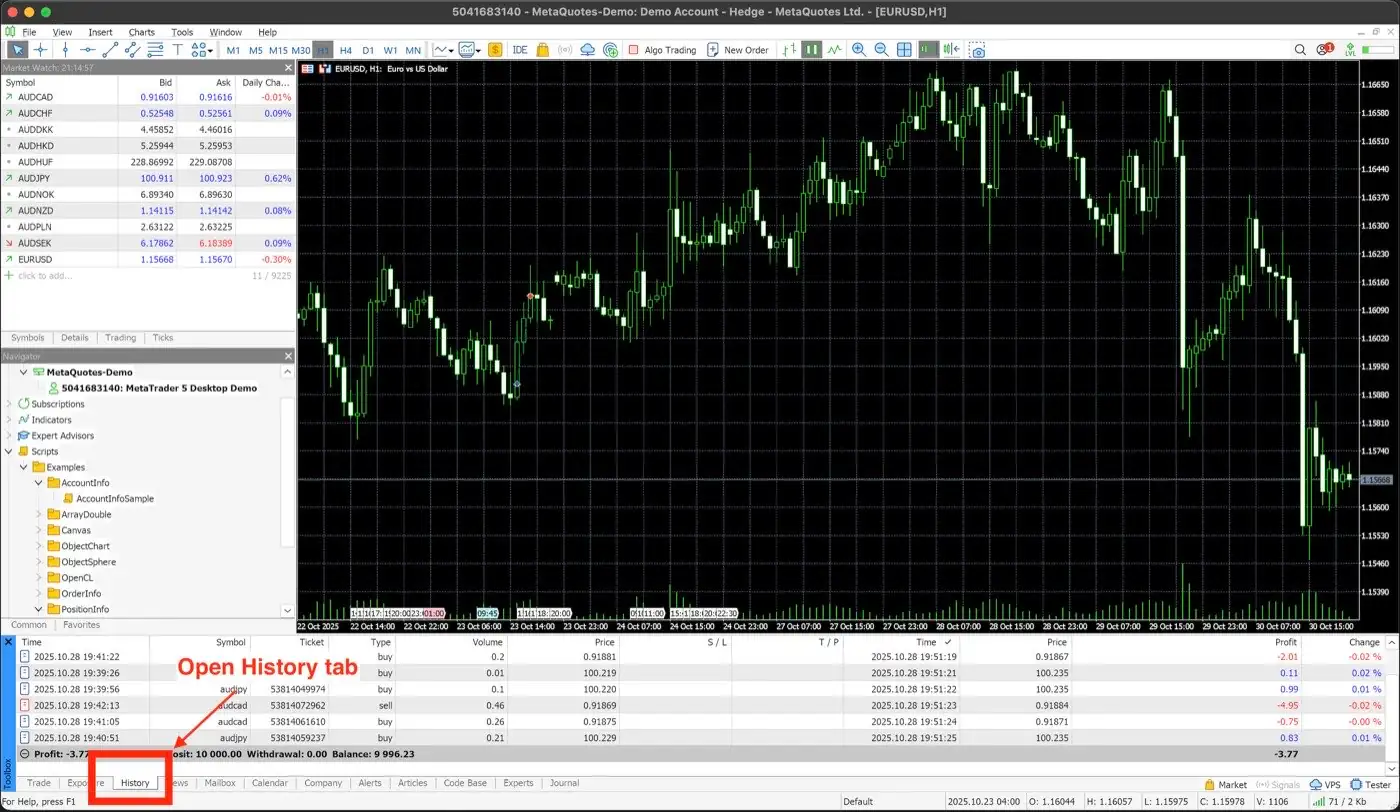
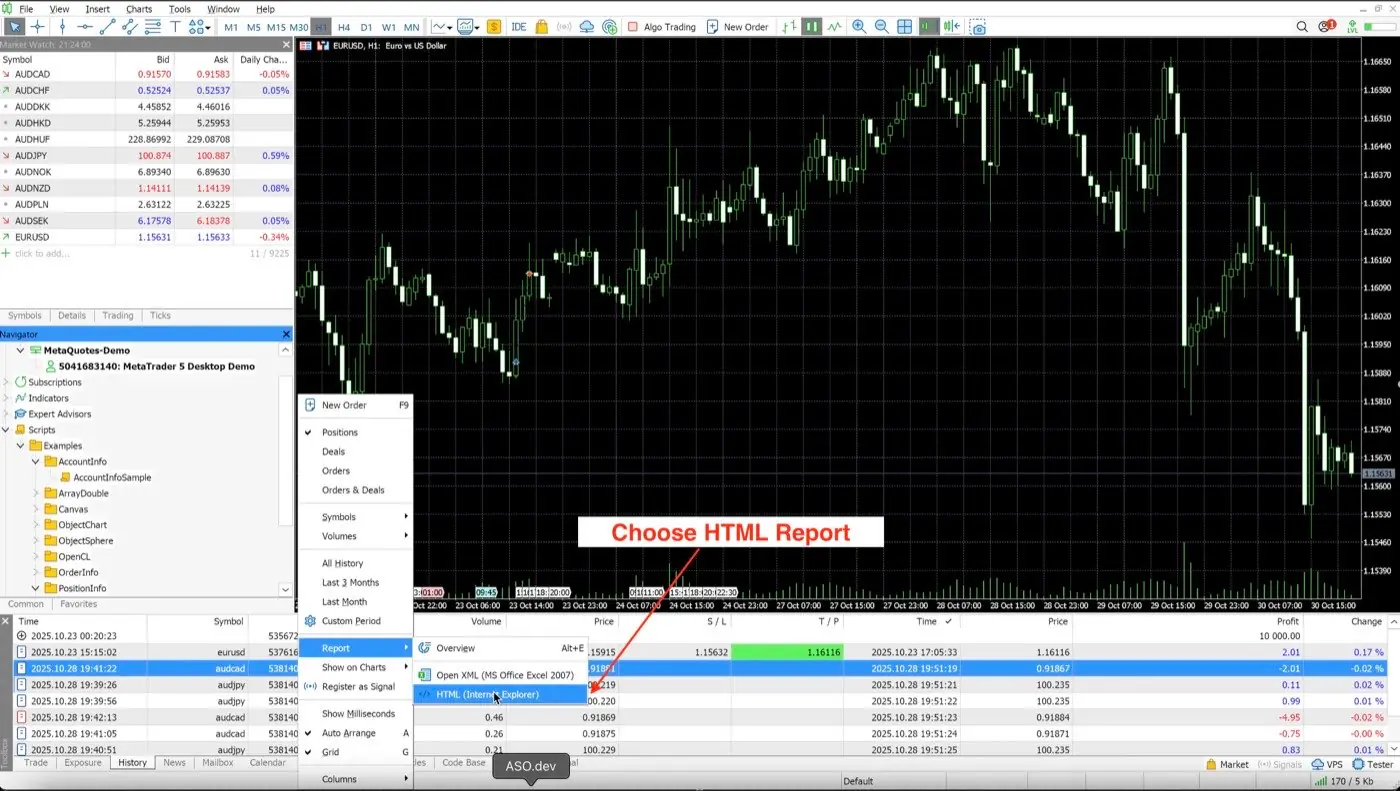
The report has to be HTML from History → Report, and it has to be in English. Switch MT5 to English under View → Languages and export again.

Trades look stale

Auto Sync updates hourly and only picks up closed positions. Resync now is available about once every 15 minutes.

All 459 confirmed MetaTrader 5 brokers

Every broker below connects with the steps on this page. The most-used ones have their own setup page — those names are linked.

  • 4xHub
  • 9 Square FX
  • A Markets
  • A1 Capital
  • AAAFX
  • ABH Forex
  • Access2Markets
  • Accuindex
  • ActivTrades
  • ACY Securities
  • Admiral Markets
  • ADN Broker
  • ADS Securities
  • Advanced Markets
  • Aeron
  • Afterprime
  • Agile Global
  • AH Capital
  • Aiprime
  • Ak Yatirim
  • Al Salam Bank
  • Alamiya Markets
  • AM Wealth
  • AmanTrade
  • AMP Global Clearing
  • Anzo Capital
  • APC Prime
  • Artemisia Markets
  • Aspire Global
  • ATFX
  • ATG World Trading
  • ATM Capital
  • ATN Capital
  • Audacity Capital
  • Auric International
  • Aurra Markets
  • Ava Trade
  • AvoraMarkets
  • Axel Private Market
  • Axion Trade Limited
  • Axiory
  • AYA Markets
  • Balance Global Capital
  • Bank of Solidus
  • Bayocean
  • Ben Capital
  • Best Wing Global Markets
  • BestonFX
  • Big Global Markets
  • Bitdelta
  • Black Bull Markets
  • Black Pearls
  • Blackridge Capital Management
  • Blackwell Global
  • Blue Suisse
  • Blueberry Markets
  • Bold Prime
  • Born2trade
  • bossaFX
  • Bright House Capital Markets
  • BrightFunded
  • BrightWin
  • Broctagon Prime Markets
  • BTS Forex Pro
  • Bullfy
  • Bullsouq Global
  • Bullwaves
  • Bybit
  • Bybit X
  • CA Markets Global
  • Caibull
  • Camel International
  • Capital Chain
  • Capital FX Dynamics
  • Capital Investment Jordan
  • Capital Nine Global
  • Capital Point Trading
  • Capital Union Bank
  • Capital.com
  • Capitalix
  • Capitalxtend
  • CFI
  • City Traders Imperium
  • CMC Markets
  • CMG One
  • CMS Prime
  • CMTrading
  • Coinexx
  • Como Foreign Exchange
  • Core Prime
  • CPT Markets
  • CTForex
  • CWG Markets
  • CXM Direct
  • D Prime
  • Damarkets
  • Darwinex
  • DB Invest
  • Decode Global
  • Deriv
  • DIH Capital Markets
  • DK International
  • DMA Capitals
  • DNA Markets
  • Dollars Markets
  • Dominion Markets
  • DoshFX
  • Dragonstone
  • Dukascopy
  • DuraMarkets
  • Dynamic Markets
  • E-Global
  • Eagle Trader Global
  • Easy Trading Online
  • Easy Way Global
  • easyMarkets
  • ECN Trade Global
  • Edmora Markets
  • EFX Pro
  • EGM Securities
  • Eightcap
  • Elev8
  • Emperor Global Markets
  • Emperor International Exchange (Hong Kong)
  • Equiti
  • Equitick
  • Errante
  • Eurobank
  • Exclusive Markets
  • ExePrime
  • Exispro
  • Exness
  • ExoraPrime
  • EZ Square Tech
  • FastOne Markets
  • FBL Global
  • FBS
  • FIBO Group
  • Finalto
  • FINAM Forex
  • FinPrime Group
  • First Bullion
  • FleGrowth
  • FlexInvest
  • Focus Markets
  • Foreaxa
  • Forex Club
  • FOREX.com
  • ForexCityPro
  • FOREXer
  • Forexite
  • ForexMart
  • Forexpress
  • Fortuna Markets
  • Fortune Prime
  • Foxx Funded
  • FP Markets
  • FPM Trading
  • FQ Holdings
  • FreshForex
  • FT Worldwide
  • FTD
  • FTMO
  • Fundedelite
  • Funding Traders
  • Fusion Markets
  • FXBITI
  • FXGlobe
  • FXTF
  • FXTM
  • Fxview
  • G2G Group
  • Galaxy Financial Services
  • Garnet Trade
  • GBE brokers
  • GCFX
  • Gerchik & Co
  • GIC
  • Gifx Prime
  • GKM Global Tech
  • Global Buana Karya
  • Global Financial Contracts
  • Global Futures Services
  • Global Markets Group
  • Global Trend Markets
  • Global Vision Group
  • GNT Capital
  • GO Markets
  • GOC Prime
  • GODO
  • Golden Bar Trading
  • Golden Brokers
  • Golden Financial Solutions
  • Golden Fortune Derivatives
  • Golden Hen Fund
  • Golden Hen Securities
  • Golden Pivot Capital
  • Golden River
  • Golden Trader
  • Goldhub International
  • Goldwell Capital
  • Grand Capital
  • Grand Markets
  • Grasberg International
  • Great Bright International
  • Grow Brokersx
  • GS Capital
  • GTCFX
  • Hantec Markets
  • Harta International
  • HeroFX
  • HF Markets
  • Hirose Financial
  • HK Junan International
  • Hola Prime
  • Hong Kong Red Lion Capital
  • Hua Ren International
  • HYCM
  • iBull Capital
  • IC Funded
  • IC Markets
  • iCare Forex
  • ICM Brokers
  • ICM Capital
  • IFX Brokers
  • IG
  • IkasForex
  • imTrader
  • INFINOX
  • INGOT Brokers
  • Integral
  • Inter Pan Pasifik
  • InterStellar Financial
  • InterTrader
  • Inveslo
  • InvestingFox
  • IQ Global
  • iQuoto
  • Iron FX
  • IST Markets
  • ITBFX
  • iTexSys
  • Jasa Mulia Forexindo
  • JFD
  • JinTrust Markets
  • JKV Global
  • JM Financial
  • Juno Markets
  • Just2Trade
  • JustMarkets
  • KCM Trade
  • Kenanga
  • KIRA Markets
  • Kumo Markets
  • KVB Prime
  • L7 Prime
  • Land Prime
  • Landmark Markets
  • Lane Square
  • LDN Global Markets
  • LeadCapital Corp
  • Leads2Performance
  • Leverate
  • Libertex
  • Lirunex
  • Lite Finance
  • LLA Markets
  • LMAX
  • Long Asia Group
  • Lord Prime
  • M4Markets
  • Markets.com
  • Mashreq
  • Match Liquidity
  • Match Securities
  • Match Trade
  • Maxrich Group
  • Mega Fusion Group
  • Merlion Global
  • Meta Quotes
  • MEX
  • Midas FX
  • Midas Menkul
  • Ming Tak
  • Mohicans
  • Moneta Markets
  • Monex
  • Moya Markets
  • MRG Mega Berjangka
  • MTrading
  • Mula Markets
  • MultiBank FX
  • MultiLP
  • My MAA Markets
  • NAGA
  • NCM Global
  • NewBillion Financial
  • No Dealing Desk
  • No Limit Markets
  • Noor Almal
  • Noor Capital
  • Oanda
  • Octa FX
  • OEXN Limited
  • OGM International
  • On Shun Golden
  • Onam Trading
  • One World Markets
  • OneRoyal
  • Opheleo Holdings
  • Opo Group
  • OpraMarkets
  • Orbex
  • Pangaea Markets
  • PDMBulls
  • Pelliron
  • PepperStone
  • PFH Markets
  • Phyntex Group
  • Pleasing Golden
  • Poxprime
  • PPI
  • PPL International
  • Pravda Markets
  • Prime Codex
  • Prime Markets FX
  • PrimeTime Global Markets
  • Primewave FX
  • PrimeX Capital
  • PrimeXBT
  • PrimeXM
  • PSFX International
  • PU Prime
  • Pure M Global
  • Purple Trading
  • QBN Global
  • QMMFX
  • Qorva Markets
  • QQ Global Group
  • Quantix FS
  • QuantumTrade Global Markets
  • RA Prime
  • Raise Global
  • Rally Trade
  • RannForex
  • Raw Forex
  • Raze Global Markets
  • River Prime
  • RM Investment Bank
  • RoboForex
  • RoboMarkets
  • Royal Investment Markets
  • Scandinavian Capital Markets
  • Scope Markets
  • Scope Prime
  • SEC Markets
  • Seven Capitals
  • Seven Star FX
  • SF Capital
  • ShengXuanDe Global Fund
  • Skilling
  • Smart Financial Services
  • Smart Trader
  • SmartCube FX
  • SmartFX
  • SmartTool Trading
  • SR Global Markets
  • SSC Smart
  • ST Global Markets
  • STARTRADER Prime
  • STMarket
  • Swissquote
  • Sword Capital
  • Tauro Markets
  • TD Capital
  • TegasFX
  • TeleTrade
  • Templer Securities
  • Tera Yatırım
  • TF Capital
  • The Kingdom Bank
  • ThinkMarkets
  • Tickblue Global
  • Tickmill
  • TP Trades
  • Trade Magic
  • Trade Match
  • Trade Quo Global
  • Trade Securities
  • Trade Set Go
  • Trade Solutions
  • Trade Twenty Four 7 Markets
  • TRADE.com
  • Trade245
  • Tradehall
  • TradeMax
  • Trader's Way
  • Traders Hub
  • TraderScale
  • Tradeslide Technologies
  • TradeSmart
  • TradeUltra
  • Tradexfin
  • Trading Pro International
  • TradingMoon
  • Tradona Markets
  • Transaction Growth Tranche
  • Treno Markets
  • Triomarkets Capital
  • Trive Financial Services
  • TTCM Traders Trust Capital Markets
  • UAB Fusion Capital
  • Ubuntu Markets
  • Ultima Markets Ltd
  • Union Global Market
  • United Financial Investments
  • United International Trading
  • United Securities
  • UP Global Markets
  • Up Way China Bullion
  • Urban Holdings
  • Utrada Technologies
  • Valutrades
  • Vantage
  • Vanto Trade
  • Vault Markets
  • Victory International Futures
  • Vida Global Markets
  • VOG Bullion Markets
  • VS Capital
  • VT Markets
  • VX Capital
  • WB Invest
  • We Golden
  • Weltrade
  • WeTrade
  • WhiteForex
  • Windsor Brokers
  • Wmax Prime
  • Wonderinterest
  • World Quest
  • XA Markets
  • Xelite Markets
  • Xellion
  • XGLOBAL FX
  • Xin Wang Golden
  • XM
  • XPrime Markets
  • Xtream Markets
  • YCM Invest
  • YLG Bullion And Futures
  • YouTrade Markets
  • Zeal Capital Markets
  • zForex
  • ZFX
  • Zillionaire Markets
  • Ziraat Yatırım
  • ZMP International
  • ZX Capital Markets

MT5 journal questions

My broker is not in the list. Will it still work?

Almost certainly. The list is brokers we have confirmed, not a whitelist. If your broker gives you an MT5 server name and login, Auto Sync and HTML import work the same way. If the first sync fails, check the server name before anything else.

Do I need to enable anything with my broker?

No. There is nothing to switch on on the broker side. You only need the server name, login and password the MT5 account was opened with — live, demo or a prop challenge.

Is my password safe?

Use the investor password. It is read-only by design — it can pull history and nothing else. No one can place or close a trade with it.

How far back does MT5 history import?

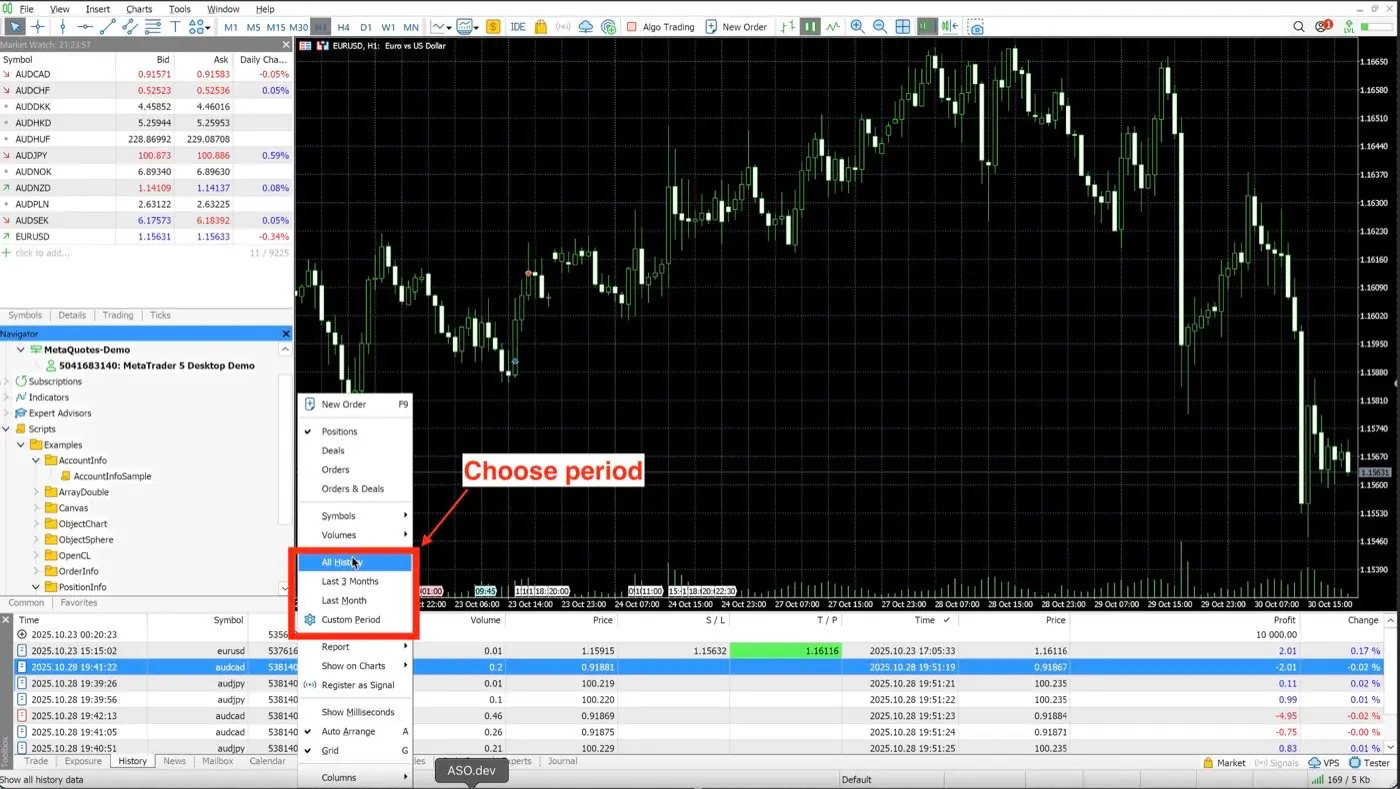
The first Auto Sync pulls everything the terminal holds for that account. For file import you choose the period yourself when you right-click History — pick All history the first time, then shorter windows for top-ups.

Can I journal several MT5 accounts from different brokers?

Yes. Connect each account separately; they sit side by side in one journal with the same metrics, so you can compare brokers and prop firms directly.

What about MetaTrader 4?

MT4 accounts import from an exported history file rather than Auto Sync. The journal, reports and Review Sessions are the same.

Does it cost anything to try?

The journal itself is free with manual entry and no time limit. File import starts at $9.90/mo on Basic; Auto Sync is $19.90/mo on Pro.

Start your MT5 trading journal

Create a free account, connect the account you actually trade, and let the first sync tell you something you didn't know.

TradeReview is not affiliated with MetaQuotes or with any broker named on this page. Broker names are used for identification only and do not imply endorsement or sponsorship. Trading involves risk; nothing on this page is financial advice.