Pick Demo for most challenges
Evaluation and many funded accounts run on a demo server. If Connect fails on Live, try Demo with the same server and login.

TradeLocker trading journal · Stocks · Forex · Futures · CFD
Connect your TradeLocker account once, live or prop firm, and your full closed-trade history lands in the journal. New trades follow every hour, so you review instead of copying fills by hand.
Free account · no card · Auto Sync on Pro
Can I connect TradeLocker to a trading journal?
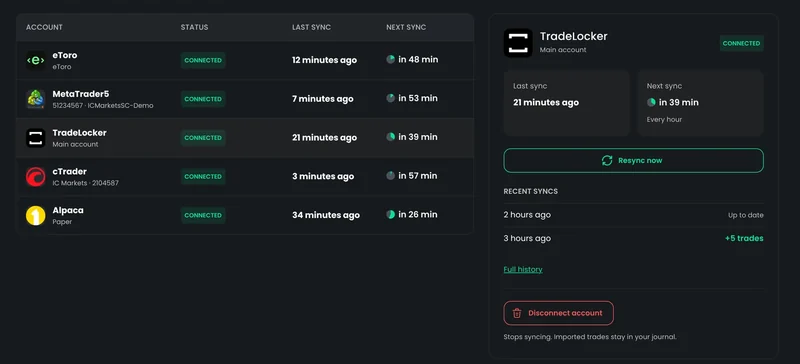
Yes. In TradeReview you pick TradeLocker under Broker Sync, choose Live or Demo, and enter the server, your TradeLocker email and password once. The first sync imports your full closed-trade history; after that, new trades arrive every hour, and you can press Resync now once every 15 minutes. The connection is read-only, so it cannot place or close trades. Prop firm accounts on TradeLocker work the same way, and several accounts under one login are linked automatically. Auto Sync is on the Pro plan ($19.90/mo); manual journalling is free, with no card and no time limit.
It takes about two minutes. You need the same details you use to sign in to TradeLocker.
Watch the 3-minute TradeLocker sync walkthrough
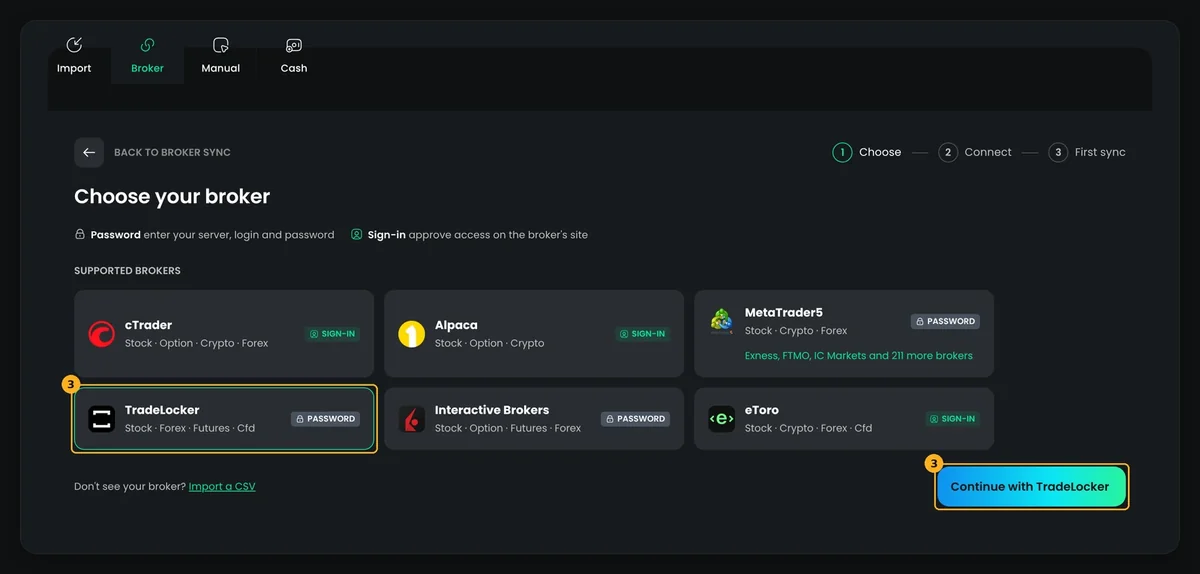
Step 2
Select TradeLocker and continue.
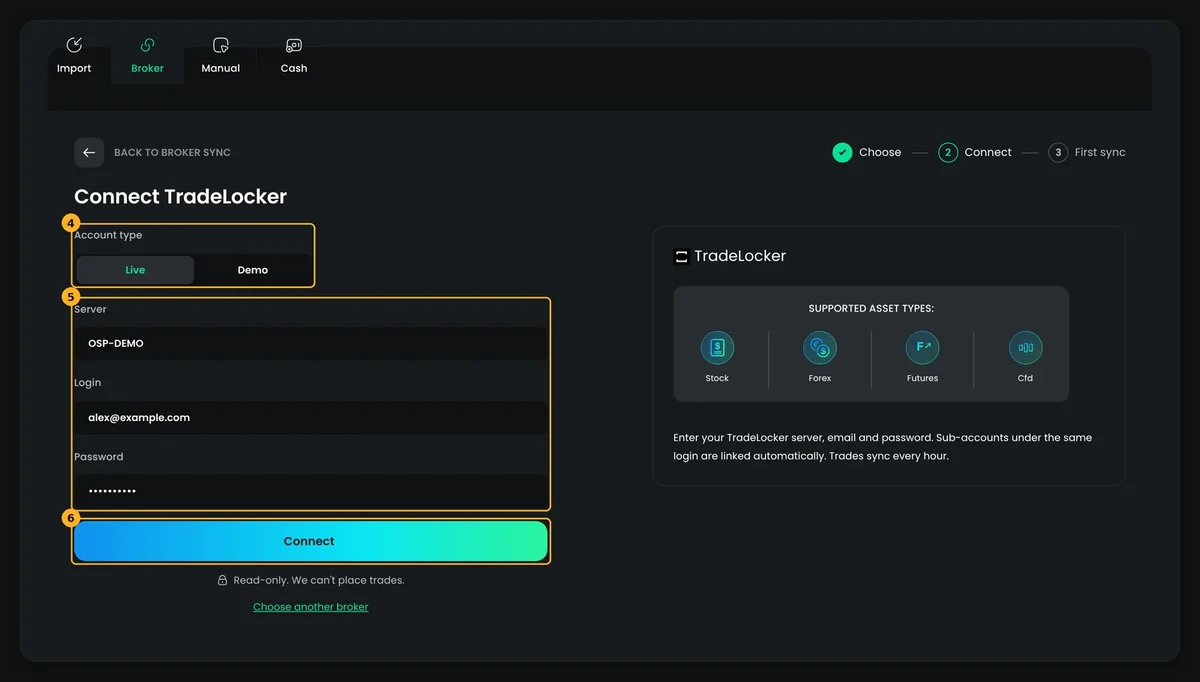
Steps 3–5
Account type, server, email and password, then Connect.
Many prop firms run their challenges and funded accounts on TradeLocker. They connect the same way as a live account, with three things worth knowing.
Evaluation and many funded accounts run on a demo server. If Connect fails on Live, try Demo with the same server and login.
If your firm gives you several accounts under the same TradeLocker login, TradeReview links each one automatically.
Your TradeLocker accounts sit in one journal next to MT5, cTrader or Interactive Brokers, with the same metrics, so you can compare them directly.
TradeLocker lists your closed positions. Once they are in TradeReview, you can ask why you won or lost: by strategy, by mistake, by the note you wrote before you clicked.
Add the drawdown chart to your dashboard and see how far you are from your peak, one of the numbers prop firms watch most closely.
Tag a mistake on a trade once and the dashboard counts how often it happens.
Assign a strategy to each trade and see its own win rate, P&L and rules side by side with the others.
Go through your synced trades one by one: chart, notes, tags, and what you'd do differently next time.
Usually the wrong account type, server, email or password. Prop firm accounts are usually Demo. Check the server spelling and try again.
Most often your TradeLocker password changed. Click Update password (or Reconnect) on the Broker Sync page. Trades already imported stay in your journal.
Auto Sync runs every hour and picks up closed trades. Press Resync now for an update right away; it is available once every 15 minutes.
Accounts under the same login are linked automatically. An account with a different TradeLocker login needs its own connection: click Add new broker again.
Yes. Live, demo and prop firm accounts on TradeLocker all connect the same way. Choose the account type that matches (prop firm accounts usually run on Demo), then enter the server, your TradeLocker email and password.
TradeLocker has no separate read-only password, so you sign in with your normal login. The connection is read-only: TradeReview reads your trade history and cannot place, change or close trades. If you change your TradeLocker password later, update it on the Broker Sync page.
The first sync imports your full closed-trade history from TradeLocker. After that, each hourly sync adds new trades, with a short overlap so nothing is missed.
Every hour, automatically. If you want trades in right away, press Resync now on the Broker Sync page; it is available once every 15 minutes.
Stocks, forex, futures and CFDs traded through TradeLocker.
Yes. Accounts under the same TradeLocker login are linked automatically. Accounts with a different login are added as separate connections, and they all sit in one journal.
Auto Sync for TradeLocker is on the Pro plan ($19.90/mo). The free plan has no time limit and needs no card: you can log trades by hand and try almost every journal feature first.
No. This is an independent setup guide. We are not partnered with, endorsed by or sponsored by TradeLocker or any prop firm.
Create a free account, connect the account you actually trade, and let the first sync tell you something you didn't know.
TradeReview is not affiliated with TradeLocker or with any broker or prop firm that offers it. The TradeLocker name is used for identification only and does not imply endorsement or sponsorship. Trading involves risk; nothing on this page is financial advice.