If you’re serious about investing, building a custom spreadsheet to track stocks is one of the most powerful first steps you can take. It’s more than just a place to log numbers; it’s a hands-on tool that builds discipline and a deep understanding that no automated software can replicate.
Why a Custom Spreadsheet Is a Trader’s Secret Weapon
Before they ever touch complex platforms, many successful traders start right here. We understand the struggle — broker statements can be confusing, and the constant market noise is overwhelming. A simple, well-built spreadsheet cuts through that chaos, giving you a clear, controlled view of your own investment world.
The act of building your tracker is like an unfiltered look in the mirror. It’s a foundational exercise that connects you directly to your results, shifting you from passively watching numbers to truly understanding what drives them. This process doesn’t promise easy profits, but it does promise clarity.
Taking Full Ownership of Your Data
When you build the system, you decide what metrics actually matter. Forget a broker’s one-size-fits-all dashboard. You can create a personalized view that aligns with your specific goals and trading style, which fosters a much deeper connection to every decision you make.
This hands-on approach delivers some serious advantages:
- Total Customization: Want to track your win rate on Tuesdays or your performance in the tech sector? No problem. You can track unique metrics that standard platforms would never offer.
- Forced Discipline: Manually entering every trade reinforces the real-world impact of each click. It forces a pause and a moment of reflection — a powerful antidote to emotional, impulsive trading.
- Deeper Understanding: You’ll finally grasp the mechanics behind your performance. You’ll see how commissions really eat into your net profit or the true cost basis of a position you’ve been adding to over weeks or months.
Building a spreadsheet isn’t just about logging trades; it’s about building a framework for disciplined thinking. You’re not just tracking stocks — you’re tracking your own behavior, decisions, and growth as a trader.
A Foundation for Long-Term Success
Even after adopting more advanced tools, many seasoned investors still maintain a personal spreadsheet. It’s a foundational skill that gives them a granular, behind-the-scenes view of how their portfolio is truly operating. It becomes their personal source of truth.
This simple tool also helps you tune out the “groupthink” of financial news by grounding every decision in your own data. It’s your private arena to analyze what works, learn from what doesn’t, and steadily refine your strategy for the long haul — without any outside noise.
Building Your Stock Tracking Spreadsheet Foundation
Alright, let’s roll up our sleeves and start building. Any powerful spreadsheet to track stocks starts with a solid, logical structure. Staring at a blank grid can feel a little intimidating, but trust me, setting up the right columns from the get-go is the single most important step. It’s what turns raw data into real, actionable insight.
This isn’t just about logging tickers. It’s about capturing the full story of each trade, from the moment you hit “buy” to the moment you close it out. A well-organized foundation ensures every calculation you make down the line is accurate and meaningful, giving you a true reflection of your performance.
The Essential Columns for Every Trade
To build a tracker that actually works for you, you need to go beyond just the stock symbol and the price you paid. Small details, like trade dates and commission fees, can have a huge impact on your actual returns. Think of these columns as the non-negotiable building blocks of your system.
Getting these fundamentals right from the start is what separates a casual log from a serious analytical tool. Here’s a breakdown of the core data points you must include for every single transaction you make.
Essential Columns for Your Stock Tracking Spreadsheet
| Column Name | Description & Example | Data Type |
|---|---|---|
| Ticker Symbol | The unique identifier for the stock. Ex: NVDA, TSLA | Text |
| Trade Date | The exact date you executed the buy or sell order. | Date |
| Action | A simple descriptor like “Buy” or “Sell”. | Text/Dropdown |
| Quantity | The number of shares bought or sold. Pro tip: use negative numbers for sells. Ex: -50 | Number |
| Price Per Share | The average price you paid or received for each share. | Currency |
| Commissions & Fees | All broker fees, which directly impact your net profit. | Currency |
Tracking these elements with discipline is crucial. Overlooking even small fees can seriously distort your performance metrics, giving you a false sense of profitability. If you want to see a great example of this in action, check out our comprehensive trading journal template for Google Sheets.
Calculating Your Core Performance Metrics
With your foundational columns in place, you can now add the formulas that bring your spreadsheet to life. This is where the magic happens. These calculations will transform your raw transaction data into real performance metrics, showing you exactly where you stand with any given trade.
Let’s walk through a practical example. Imagine you bought 10 shares of NVDA at $900 per share and paid a $5 commission.
Your Total Cost Basis is the true, all-in cost of acquiring your position. The formula is refreshingly simple:
(Quantity * Price Per Share) + Commissions
For our NVDA trade, this would be (10 * 900) + 5, giving you a Total Cost Basis of $9,005. This is the number you need to beat to turn a profit, not just the $9,000 purchase price.
Your cost basis is your true break-even point. Forgetting to include commissions is a common mistake that inflates your perceived gains. Always account for every penny spent to get an honest picture of your performance.
This initial setup provides the bedrock for all future analysis. As you add more trades, this structured data will allow you to calculate both your realized (closed trades) and unrealized (open trades) profit and loss — which is where the real power of a custom spreadsheet begins to shine.
Bringing Your Spreadsheet to Life with Dynamic Data
A static log of your trades is a decent starting point, but let’s be honest — it’s not enough. A dynamic spreadsheet is where the real progress happens. Manually punching in prices every day is not only tedious, but it’s a recipe for human error, which can lead you to make bad decisions based on old information.
By automating your spreadsheet to pull live data, you transform it from a simple record into a living, breathing dashboard. This is the crucial step that lets you see your portfolio’s value and unrealized gains update in real-time. There’s nothing quite like hitting refresh and watching all your calculations instantly adjust to what the market is doing right now. It saves you a ton of work and, more importantly, gives you confidence that the numbers you’re seeing are accurate.
Automating Live Prices in Google Sheets
If you’re using Google Sheets, the =GOOGLEFINANCE function is about to become your new best friend. This function can pull a huge range of financial data directly into your cells with a simple formula. It’s the engine that will drive your entire tracker.
To get a stock’s current price, all you need is its ticker. A “ticker” is just the unique symbol for a stock, like “AAPL” for Apple.
For example, to get the live price for Apple, you’d simply use:
=GOOGLEFINANCE("AAPL", "price")
This formula tells Google Sheets to grab the real-time price for the ticker “AAPL.” You can easily apply this to your whole portfolio. If your tickers are in Column A starting at row 2, just pop =GOOGLEFINANCE(A2, "price") into the corresponding cell and drag that formula all the way down. Done.
Unlocking Rich Data in Excel
Excel users are not left out. If you have a Microsoft 365 subscription, the built-in ‘Stocks’ data type is a game-changer. This tool turns a boring list of tickers into rich, interactive data objects packed with useful information.
Here’s how you get it working:
- Type your ticker symbols (like MSFT, GOOG, etc.) into a column.
- Highlight the cells with your tickers.
- Head over to the Data tab and click on Stocks.
Just like that, Excel converts the text into interactive data. A small icon will appear, and clicking it lets you pull in dozens of different data points — price, P/E ratio, 52-week high, market cap, you name it — into the adjacent columns. Many of the data-driven ideas in our guide to creating a profit and loss template in Google Sheets can be applied here, too.
The real goal of automation isn’t just to save a few minutes; it’s about boosting accuracy so you can perform immediate analysis. When your unrealized P&L updates on its own, you get an instant, clear-eyed view of your portfolio’s health without lifting a finger.
The global stock exchanges market has expanded in recent years, which means traders need better tools than ever to keep up. This surge is exactly why spreadsheets, supercharged with live data feeds, are still a go-to for managing the chaos. You can dive deeper into these market trends in this stock exchanges market report.
Once you integrate these dynamic functions, your spreadsheet truly evolves. It stops being a historical record and becomes a powerful analytical tool that helps you make sharp, timely decisions about your investments.
Visualizing Your Performance with Charts and Dashboards
Raw data is a great start, but let’s be honest — staring at rows of numbers can be draining. The real insights emerge when you turn that data into visual charts you can absorb at a glance. This is the moment your spreadsheet to track stocks goes from being a simple logbook to a powerful performance dashboard.
Creating charts directly in your spreadsheet helps you see the bigger picture and tune out the day-to-day market noise. It’s all about building that high-level view that pushes you toward strategic, long-term thinking instead of making emotional, knee-jerk reactions based on one stock’s wild swing.
This process is simpler than it sounds. You’re essentially just channeling your organized data into a few key visuals.
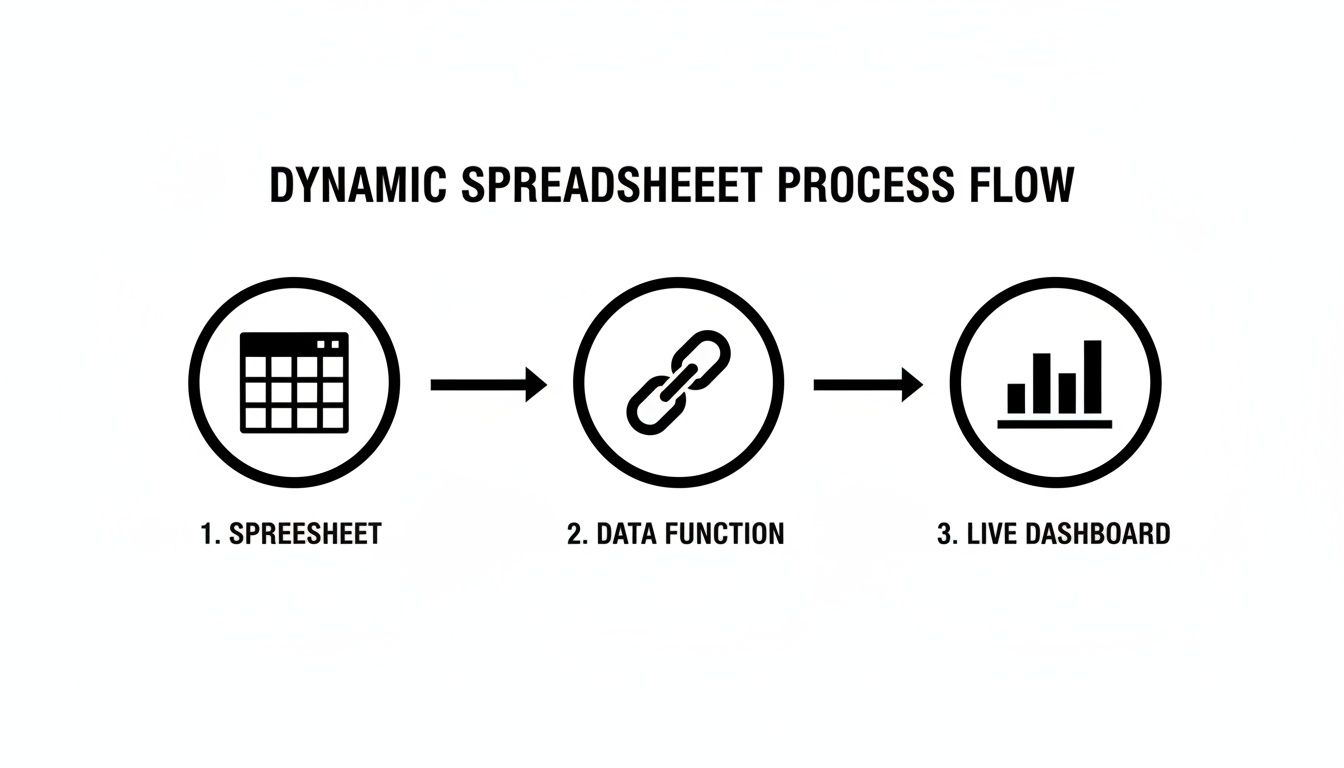
As the diagram shows, your structured spreadsheet — kept alive with those live data functions — feeds right into the charts that become your personal command center.
Creating Your Core Visuals
You don’t need to go overboard with a dozen complicated charts. Just focus on a few that tell the most important stories about your portfolio. We highly recommend creating a separate, dedicated “Dashboard” tab in your spreadsheet to keep everything clean and uncluttered.
Here are three charts every trader should build first:
- Portfolio Allocation Pie Chart: A simple pie chart is the quickest way to see how your capital is spread out. It instantly tells you if you’re too heavy in one stock or sector, which is critical for managing risk.
- Performance Bar Chart: Want to know who the real winners and losers are? Use a bar chart to compare the realized or unrealized P&L of each position. It’s a brutally honest look at what’s working and what isn’t.
- Portfolio Value Line Chart: This is arguably the most important visual you can create — your personal equity curve. Plotting your total portfolio value over time reveals your growth and shows you the real impact of your trading decisions.
An equity curve is your personal report card. It filters out the noise of individual trades and shows you the one thing that matters most: whether your account is growing consistently over the long term.
Building Your Personal Equity Curve
Creating this line chart is surprisingly easy. Just set aside a small area in your spreadsheet to log your total portfolio value at the end of each day or week. All you need are two columns: “Date” and “Portfolio Value.”
Once you have a bit of data, you can generate a line chart that tracks your progress. Seeing that line trend upward over weeks and months is one of the best motivators out there. Market performance in recent years has shown exactly why this kind of tracking is non-negotiable. Traders everywhere use spreadsheets to plot their equity curves, win/loss ratios, and position sizes to understand market movements. You can get a sense of these global market trends in these charts.
This kind of disciplined visualization is what separates reactive traders from strategic investors. It grounds every decision you make in your own performance data, helping you build the patient, long-term mindset required for success.
When Your Spreadsheet Hits Its Limits
A custom spreadsheet to track stocks is a fantastic first step. It forces you to get hands-on with every single trade, building a solid foundation of discipline and a real understanding of your performance.
But as you trade more and your analysis gets deeper, you start to feel the friction. We’ve all been there — spending more time hunting down a broken formula or manually punching in a dozen trades than actually analyzing our strategy. The very tool that once brought clarity now feels like a bottleneck, creating tedious work and opening the door for costly mistakes.
When you’re trying to capture the subtle details of your trading psychology or just keep up with a higher volume of trades, a spreadsheet’s limitations become clear.
From Manual Entry to Inefficient Analysis
As your trading frequency picks up, manual data entry quickly turns into a massive time sink. What started as a quick five-minute task at the end of the day can morph into a dreaded chore. Soon, you find yourself tempted to just skip logging trades altogether, losing valuable data in the process.
This manual process is also a breeding ground for errors. A single typo in a price or share quantity can throw off your entire P&L, leading you to make decisions based on bad data. These aren’t just small slip-ups; they can hide real problems in your strategy and give you a false sense of either security or failure.
Let’s not forget the history here. Spreadsheets like VisiCalc and Lotus 1-2-3 were revolutionary for traders back in the 1980s. Still, modern analysis frequently shows that a high percentage of spreadsheets used in finance contain significant errors, which can easily lead to misguided trades. You can read more about the evolution and market growth of spreadsheet software to get the full picture.
The Missing Psychological Layer
Perhaps the single biggest limitation is what a spreadsheet can’t easily track: your mindset. Why did you exit that winning trade too early? Was your position size driven by solid conviction or just plain fear? A standard spreadsheet struggles to capture this kind of critical, qualitative data.
A spreadsheet is great at answering what happened with your trades. A dedicated trading journal is designed to help you discover why it happened, connecting your emotional state to your financial outcomes.
This is where more advanced tools enter the picture. A dedicated trading journal bridges this gap, integrating your performance metrics with crucial psychological insights. Features like automated broker sync completely eliminate manual entry and its errors, while advanced analytics can uncover behavioral patterns that a spreadsheet would never reveal.
If you’re curious about what’s possible beyond a basic grid, our guide on how to track your stock portfolio for free offers some great next steps.
Ultimately, recognizing these limits is a sign of growth. It means you’re ready to evolve from just tracking numbers to analyzing the complete picture of your trading performance.
Have Questions? We’ve Got Answers
Once you start building your own stock-tracking spreadsheet, a few questions are bound to pop up. Don’t worry, every trader has been there, staring at a complex formula or wondering if they’re tracking the right metrics. Let’s walk through some of the most common questions to help you build a more powerful and confident tracker.
Getting comfortable with the formulas and the overall structure is just part of the process. The real goal is to move from simply collecting data to gaining real insight.
What’s the Best Formula to Calculate My Total Portfolio Return?
This is probably the trickiest question of all, because the “best” formula depends on how much detail you want. Adding and withdrawing cash can seriously distort your performance numbers if you’re not careful.
For a quick and easy calculation, you can use the Simple Return formula:
(Current Portfolio Value - Initial Portfolio Value) / Initial Portfolio Value
But this doesn’t account for money you’ve added or taken out along the way. For a more accurate picture that considers cash flow, most serious investors use either the Time-Weighted Rate of Return (TWRR) or the Internal Rate of Return (IRR). The TWRR is often considered an industry standard for measuring pure investment performance, but it’s complex to calculate in a spreadsheet.
A more practical solution is the IRR, which you can calculate in Google Sheets using the =XIRR function. This requires you to log the date and amount of every single cash movement — buys, sells, deposits, and withdrawals.
How Can I Track Stock Dividends in My Spreadsheet?
Dividends are a crucial part of your total return, so you absolutely need to track them. Ignoring them is like leaving cash on the table.
The easiest way to handle this is to treat dividends as a unique transaction type in your log. Just add a few dedicated columns:
- Action: Add a new category called “Dividend.”
- Dividend Amount: Log the total cash you received.
- Dividend Date: Record the exact date the dividend was paid.
By logging dividends this way, you can easily sum them up to see your total income from payouts. It also keeps your cash balance and overall P&L calculations accurate, making sure you account for every source of profit.
Can I Use a Spreadsheet to Track Options Trades?
Yes, you can… but it gets complicated, fast. While the core idea of logging transactions is the same, options have many more moving parts than stocks.
Tracking options in a spreadsheet is possible, but it demands meticulous data entry. The added complexity often highlights the point where a dedicated trading journal becomes a more efficient and error-proof tool.
To track options properly, you’ll need to add columns for things like:
- Contract Type: Call or Put
- Strike Price: The price where the option can be exercised.
- Expiration Date: The date the contract becomes worthless.
- Premium: The price you paid or received for the contract.
A spreadsheet can handle basic options trades, but the whole system can start to buckle with multi-leg strategies like spreads or iron condors. The risk of a broken formula skyrockets, and managing expirations or assignments becomes a very manual, tedious task. Honestly, this is the natural point where most traders realize they need a specialized tool built for the job.
Ready to move beyond the limitations of a basic spreadsheet? TradeReview is an automated trading journal that syncs directly with your broker, eliminating manual data entry and providing deep performance analytics. Take control of your trading and discover your edge today. Learn more at https://tradereview.app.