The Trader’s Guide to the Google Journal App in 2026

·

If you’ve been on the hunt for a dedicated “Google Journal app” designed for traders, let me save you some time: it doesn’t exist. Google has some fantastic tools that people try to adapt for journaling, but there’s no single, official app built to track your trades, analyze your performance, or help you master your trading psychology.

It’s a common trap many of us fall into. We start by using these general-purpose apps, driven by a newfound commitment to discipline, only to find they hit a wall. This can be frustrating, but recognizing the tool’s limits is the first step toward building a system that actually supports long-term growth.

What Google Offers Instead

When you search for a Google journal, you’ll likely run into two main options: Google Keep for quick notes and the Pixel Journal for AI-powered personal reflections. Both are great for what they were designed for, but for a trader trying to build a data-driven edge, it’s important to know their limits.

A workspace flat lay showing a smartphone with Pixel Journal app, coffee, and a 'No Single APP' note.

Think of it this way: you wouldn’t enter a Formula 1 race with your family sedan. Sure, the sedan will get you from A to B, but it simply wasn’t engineered for high-speed performance. Google’s tools are perfect for organizing your daily life, but they weren’t built for the rigorous demands of trade analysis. Trading requires more than just notes; it demands a system built for continuous improvement over the long haul.

The Key Differences for Traders

For a trader, the gap comes down to one thing: data. A real trading journal is more than just a diary — it’s an analytical powerhouse. It has to do a lot more than just hold your thoughts.

A trading journal should be your system for spotting patterns, calculating performance metrics, and holding yourself accountable. Without data, you’re just guessing.

Generic apps like Google’s just can’t keep up. They weren’t created to handle the specific tasks a trader needs. They can’t:

  • Calculate Performance Metrics: There’s no built-in way to automatically figure out your win rate, profit factor, or average risk-to-reward ratio. These aren’t just fancy terms; they are the vital signs of your trading health.
  • Visualize Your Equity Curve: You can’t see a chart of your account’s growth over time to spot trends and drawdowns.
  • Integrate with Brokers: You’re stuck with manual data entry, which is not only slow but also a recipe for errors. There’s no way to automatically import your trades.
  • Tag and Filter by Strategy: You can’t easily tag trades with setups like “Breakout” or “Mean Reversion” and then analyze how profitable each strategy really is.

Recognizing these limitations is the first real step toward building a system that actually helps you grow. A basic note-taking app might feel like a good starting point, but any serious trader will eventually need a specialized platform to move from just recording trades to actively improving them.

Using Google Keep as Your Everyday Trading Log

When you’re first getting serious about keeping records, Google Keep often feels like the most natural place to start. It’s simple, it’s on all your devices, and it’s a tempting first choice when a dedicated google journal app for traders doesn’t exist. It’s basically a digital scratchpad, perfect for jotting down a quick market observation or a trade idea that pops into your head.

Just starting to log your thoughts is a huge first step. It’s a struggle many traders face, but moving from scattered notes (or no notes at all) to any kind of system is a massive win. It’s all about building that core discipline of documenting what you do, which is the bedrock of any sustainable trading career.

A hand holds a smartphone displaying a trading app with TSLA and IDEA tickers, next to a laptop and notebook, featuring the text 'Everyday Trading Log'.

Getting Started with Keep for Trading Notes

You can actually get a pretty functional, basic log going with Google Keep. If you get a little creative with its features, you can build a simple system to track your day-to-day trading.

  • Color-Code Your Notes: Try assigning colors to different outcomes. For example: green for winning trades, red for losses, and blue for trades where you followed your plan perfectly — no matter the P&L.
  • Use Labels for Assets: Set up labels for the tickers you trade most, like $TSLA, $BTC, or SPY. This lets you quickly filter and see all your notes for a specific asset.
  • Create Pre-Trade Checklists: The checklist feature is great for a pre-flight routine. Your list could include “Confirm setup on higher timeframe,” “Define stop-loss,” and “Calculate position size” to ensure you’re sticking to your plan.

These habits are fantastic for building discipline. But they’re just the starting line. Real growth happens when you can analyze hard data, not just read through old notes.

The Inevitable Limitations for Growth

This is the part where so many traders get stuck. You feel like you’re doing all the right things by taking notes, but your P&L isn’t really improving. This is an incredibly common and frustrating experience. The problem isn’t your new-found discipline; it’s the tool you’re using.

Google Keep is wildly popular because it’s so easy to use — it has thousands of positive user reviews. But those users are praising it for making grocery lists and saving links, not for the kind of specialized analysis a trader needs.

The simple truth is that Google Keep can’t give you the data-driven feedback you need to actually get better. It has some serious shortcomings for any trader looking to grow:

  • No Performance Metrics: It can’t tell you your win rate, profit factor, or average R-multiple. These are the numbers that matter for long-term survival.
  • No Broker Integration: You’re stuck typing in every single detail of every trade. It’s slow, and it’s easy to make mistakes.
  • No Visual Analytics: You can’t see your equity curve to spot winning streaks or, more importantly, the drawdowns that are hurting your account.

While Keep is a solid place to begin, you’ll eventually hit a wall and need a system built for real analysis. If you like staying within the Google ecosystem, a great next step is something more powerful, like our trading journal template for Google Sheets, which gives you a lot more analytical firepower than simple notes.

Exploring the AI-Powered Pixel Journal for Traders

While Google Keep is a solid choice for a digital scratchpad, Google’s more advanced (and exclusive) answer to a google journal app is the Pixel Journal. This app is designed for AI-driven personal reflection, not just simple note-taking. It learns from your daily activities — like places you go, photos you snap, and workouts you log — to serve up personalized writing prompts.

For a trader, this creates an interesting parallel to reviewing your trading psychology. The app wasn’t built for charting or financial metrics, but its main job is to get you thinking about your habits and mindset. That’s a critical skill for anyone riding the emotional rollercoaster of the markets, and developing it is a key part of long-term success.

Using Pixel Journal for Psychological Insights

Picture a volatile trading day. The market is swinging wildly, and you’re feeling the heat. Instead of just jotting down your P&L, you could use the Pixel Journal to capture your emotional state.

  • Practical Example 1: An AI prompt might ask, “Reflect on a moment of high energy today.” Your response could be: “Felt intense FOMO during the morning crypto pump and chased a trade well past my entry signal. The rush was powerful, but the result was a loss. I need to recognize this feeling and step back next time.”

  • Practical Example 2: An AI prompt might ask, “What did you do today that required discipline?” Your response: “The S&P 500 broke a key level, but I stuck to my risk management plan and didn’t panic-sell. It felt difficult, but it protected my capital. This reinforces the importance of my rules.”

This approach shifts the focus from “what happened” to “how I reacted.” Over time, you build a powerful log of your psychological triggers, helping you connect your emotional state to your trading performance.

Its Strengths and Major Shortcomings

Google’s Pixel Journal app is a step forward in its ecosystem, using on-device AI to generate personal writing prompts. The move highlights the competition in a digital diary market that’s growing significantly. For more on this trend, you can read a recent TechCrunch analysis.

For traders, this kind of AI-driven reflection is valuable, similar to how a tool like TradeReview uses analytics to help you find your edge.

However, the Pixel Journal has two critical flaws for any serious trader. First, it lacks any quantitative analysis features. You can’t track your P&L, win rates, or any other performance data. It can’t tell you if your disciplined choices are actually leading to better financial outcomes.

Second, and this is the dealbreaker, it is exclusive to Google’s Pixel devices. This makes it completely impractical as a primary trading journal for the vast majority of traders who use other phones or do their work on a desktop.

Why General Journal Apps Fall Short for Traders

So, you’ve started logging your trades in a general notes app like Google Keep. That’s a fantastic first step. Building the raw discipline to record your actions is a milestone many new traders never reach, and you should be proud of that commitment.

But it’s a milestone you have to move past for long-term growth. The hard truth is that these apps, even a more advanced one like the Pixel Journal, were never designed for the gritty, data-heavy work of professional trading. They’re great for jotting down personal thoughts but lack the horsepower to turn your trade history into real, actionable intelligence.

Think of it like this: trying to analyze your trading with a basic notes app is like trying to navigate a cargo ship with a tourist map. Sure, it shows you the land and sea, but you’re missing the critical depth charts, current patterns, and hazard markers you need to avoid disaster. For a trader, those hidden hazards are the unprofitable patterns and psychological blind spots that silently drain an account.

A pixel journal diagram showing AI Journal branching into Personal Reflection and Trading Psychology categories.

Even with its slick AI features, a tool like the Pixel Journal is built for personal growth, not P&L analysis. The app’s main goal is to help you reflect, which is valuable. But it’s only half the story. Real improvement comes when you connect those psychological notes directly to hard performance data — something a generic google journal app substitute just can’t do.

The Critical Data Gap

The single biggest flaw with using a general app is its inability to do the math. Trading is a numbers game, plain and simple. Without the right stats, you’re flying completely blind. You might feel like you had a great week, but the data could show you’re consistently risking way too much for tiny wins — a path that is not sustainable.

A journal that only holds your notes without providing performance analytics is like a fitness tracker that logs your workouts but never shows you your heart rate, distance, or calories burned. You’re putting in the effort but getting none of the feedback required for real improvement.

A general app has no way to answer the questions that really matter to a trader:

  • What’s my actual win rate on my go-to strategy?
  • Is my profit factor (total profits divided by total losses) safely above 1.5, or am I just treading water?
  • What does my equity curve look like over the last 100 trades?
  • Which specific setup is bleeding my account dry?

These apps don’t understand entries, exits, position sizing, or risk-to-reward. You can write all those details down, but the app can’t connect the dots and give you meaningful metrics. This forces you to spend hours manually crunching numbers in a spreadsheet, which is not only tedious but also full of potential for error.

To highlight just how different these tools are, let’s compare them side-by-side.

General Notes App vs. Specialized Trading Journal

Feature Google Keep (General App) TradeReview (Trading Journal)
Trade Import Manual copy-paste only Automated import from brokers
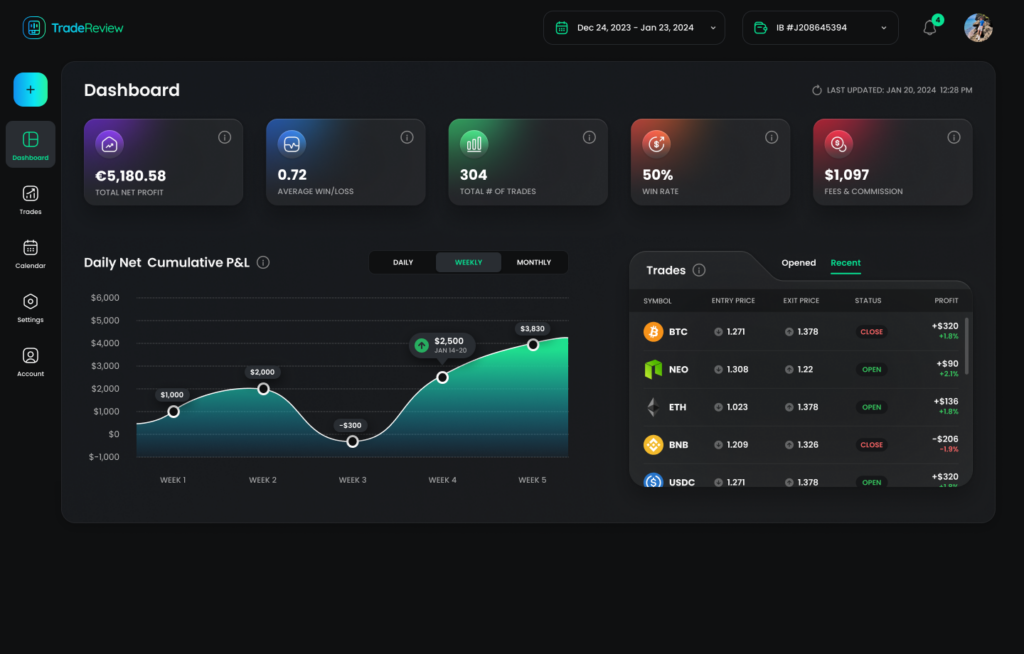
Performance Analytics None. Cannot calculate metrics. Automatic calculation of 50+ metrics (win rate, P/L, profit factor, etc.)
Equity Curve Chart Not possible Automatically generated and filterable
Setup/Strategy Tagging Basic text tags with no analysis Advanced tagging to analyze performance by setup, strategy, or market condition
Chart Markups Cannot attach charts to notes Attach multiple charts with annotations to each trade entry
Risk Management Requires manual calculation Tracks R-multiples and risk metrics automatically

The difference is stark. While a notes app can hold your thoughts, a true trading journal like TradeReview becomes an analytical partner.

Ultimately, real progress in trading isn’t just about discipline. It’s about building a feedback loop driven by hard data. And for that job, general-purpose apps just don’t make the cut.

How a Professional Trading Journal Elevates Your Strategy

So you’ve been using a general note-taking app to log your trades, and now you feel stuck. You put in the work, built the discipline of writing things down, but your performance is still flatlining. This is a common and deeply frustrating hurdle. It’s the point where you need to shift from just recording notes to actively analyzing your trading with a purpose-built tool.

A dedicated trading journal isn’t just another app; it’s a platform designed from the ground up to help you develop your skills. Unlike a generic google journal app substitute, a professional journal is built to answer the questions that actually drive your profitability. It’s what helps you move away from emotional, gut-based decisions and toward a disciplined, data-driven approach. That shift is what separates traders who struggle from those who find long-term consistency.

A desk with a computer displaying performance analytics graphs, a smartphone, keyboard, and mouse.

Uncovering Your Edge with Data

The biggest game-changer with a professional journal is its ability to do the heavy lifting for you. It’s designed to solve the exact pain points that traders run into when using manual logs or general-purpose apps.

  • Performance Analytics: Finally see your real win rate, profit factor, and average return. Instead of just feeling like a strategy is working, you get hard numbers that prove what’s making you money and what isn’t.
  • Visual Trade Calendar: Spot behavioral patterns you never knew you had. A practical example: the calendar might reveal that you consistently give back profits on Fridays. This insight is impossible to ignore and empowers you to adjust your behavior.
  • Auto Broker Sync: Forget about the soul-crushing task of manual data entry. Syncing with your broker means your data is 100% accurate and frees up hours of your time. You get to focus on analysis, not admin work.

A professional journal transforms you from a passenger to the pilot of your trading career. It gives you the instruments to navigate the market with precision, rather than just hoping you end up at the right destination.

Building Long-Term Discipline

We understand how frustrating it is to put in the effort without seeing the results you want. That feeling is something we’ve built tools like TradeReview to solve. A professional journal isn’t about chasing some “guaranteed profit” gimmick; it’s about creating a structured environment where you can build skills for the long haul. Think of it as your accountability partner.

By making detailed journaling both easy and insightful, you start laying the foundation for a sustainable career. You begin to see your losses not as failures, but as valuable data points for improvement. Every trade — win or lose — becomes a lesson. For a deeper look at the specific features that matter most, you might want to check out our guide on choosing the right trade journal app.

Ultimately, this disciplined, analytical approach is what will help you survive market volatility and grow as a trader over months and years. It’s a direct investment in yourself and your future.

Making the Switch to a Smarter Journaling System

Moving on from a basic notes app is a huge moment for any trader. It’s when you decide to stop treating trading like a hobby and start running it like a business. The idea of switching to a whole new system can feel like a massive chore, but it’s actually a simple investment in your own skills.

And don’t worry, that switch doesn’t mean all your old notes from Google Keep or a similar app are useless. Far from it. Think of them as a goldmine of past behavior. You can use that history to go back and tag old trades in a smarter system, giving you an instant look at the habits and patterns you’ve built over time.

This is all about making the jump from just jotting down thoughts to actually analyzing real, hard data. It’s a commitment to the discipline that separates professionals from the rest.

Your First Week with a Professional Journal

The key to making a new habit stick is to make it easy. Instead of trying to do everything at once, just focus on a few simple actions that deliver a big impact. This little checklist will help you get value right away without feeling overwhelmed.

  1. Connect Your Broker: This is step one for a reason. Get your auto-sync set up. It completely removes the headache of manual data entry, saves you a ton of time, and makes sure your trade data is 100% accurate from the get-go.
  2. Review Your Dashboard Daily: Just spend five minutes every morning looking at your main dashboard. Check out your core numbers like P&L and win rate. It’s a simple habit that holds you accountable for what’s really happening.
  3. Add One Psychological Note Per Trade: For every single trade that syncs, add one quick sentence about how you were feeling. Confident? Anxious? Did you rush the entry? This is how you start connecting your mindset to your results.

This isn’t about finding some magic bullet for guaranteed wins. It’s about building a solid feedback loop where every single trade — good or bad — becomes a lesson that makes you a sharper trader over the long term.

By focusing on these small, consistent steps, you turn journaling from something you should do into a powerful part of your daily routine. The real goal is to make looking at your data an essential part of your trading day.

The most successful traders we see are the ones who fully commit to this process. They know their edge doesn’t come from one home-run trade, but from constantly trying to get better, day in and day out. For more ideas on what to look for, check out our guide on the best trading journal software to find the perfect tool for your style.

Frequently Asked Questions About Trading Journals

Thinking about upgrading from a basic google journal app substitute to something more powerful? It’s a big step, and you probably have a few questions. Let’s tackle the most common ones I hear from traders who are ready to get serious about their long-term performance.

How Long Until I See Results from Journaling?

This is a great question, and it’s one that shows a commitment to the process. While you’ll feel more organized almost immediately — like in your first week — the real magic happens a bit later. Genuine results, like spotting and fixing your costly habits, usually start to surface after you’ve logged 30-50 trades.

Why that number? Because that’s when you have enough data for meaningful patterns to emerge. You’ll start to see why you win and why you lose. Think of it like hitting the gym. One workout feels good, but you don’t see real muscle growth until you’ve put in consistent effort for a month or two. The same long-term mindset applies here.

Is It Better to Use a Notes App or a Spreadsheet?

A spreadsheet is definitely a step up from a simple notes app like Google Keep. At least with a spreadsheet, you can run some basic calculations. The problem is, it still relies on endless manual data entry and completely lacks the automated, deep-dive analytics you get from a dedicated journal. We’ve seen many traders get burned out trying to maintain complex spreadsheets.

A notes app is for thoughts, a spreadsheet is for numbers, but a true trading journal is for insights. It connects your thoughts directly to your numbers, automatically showing you why you are winning or losing.

Can I Still Use Google Keep for Quick Ideas?

Absolutely! In fact, many successful traders use a hybrid system. It’s common to use Google Keep or even a physical notepad to quickly capture a market observation or a fleeting trade idea during a busy day.

The key is what you do next. At the end of the day or week, you transfer those quick thoughts into your professional journal. There, you can link them to actual trades, tag them, and analyze the outcomes. This way, you get the best of both worlds: the convenience of quick notes and the power of deep, structured analysis.


Ready to stop guessing and start analyzing? Build a professional, data-driven trading process with TradeReview. It provides the automated analytics and visual insights needed to truly understand your performance and elevate your strategy. Start your free journal at TradeReview.app.