After a long, draining session in the markets, the last thing anyone wants to do is manually punch every single trade into a spreadsheet. It’s tedious, it’s mind-numbing, and frankly, it’s the first habit to get dropped when you’re tired. We get it. The struggle to stay disciplined with record-keeping is real, and it’s a hurdle every developing trader faces.
This is where an auto import broker connection completely changes the game. It bridges the gap between your broker and your journal, syncing your entire trade history automatically. No more manual data entry, no more costly mistakes — just clean, accurate performance data, ready for you to analyze. This isn’t about finding a shortcut; it’s about using a smarter tool so you can focus your energy on analysis, not administration.
Why Manual Trade Journaling Is Costing You Money
Let’s be honest. After hours spent staring at charts, the idea of transcribing every buy and sell order feels like a huge chore. We’ve all been there, telling ourselves we’ll get to it “over the weekend,” but that weekend rarely comes. We understand the mental fatigue that leads to procrastination.

This isn’t just about avoiding an unpleasant task; it’s a silent leak in your trading capital. The discipline of journaling is often what separates traders who find long-term consistency from those who stay stuck spinning their wheels. When you skip entries or rush the process, you’re left with a flawed, incomplete picture of your actual performance, making it nearly impossible to learn from your mistakes.
The Hidden Costs of Inconsistent Data
Think of your trading journal as the black box from an airplane — it holds the raw, unfiltered truth about your habits, your strategies, and your psychological triggers. Manual entry compromises that truth in a few critical ways:
- Human Error: A simple typo can wreak havoc. Entering a price of $15.50 instead of $15.05 might seem small, but over hundreds of trades, these little mistakes compound. They’ll give you a completely distorted view of your real profitability.
- Selective Reporting: It’s just human nature to want to forget about the losers. When you’re journaling by hand, it’s easy to “forget” that one trade that blew past your stop-loss, creating a performance history that looks way better than it actually is. This emotional bias prevents you from confronting the real issues in your strategy.
- Missed Nuances: What about the details that really matter? Things like exact execution times, commission costs, or slippage often get left out of manual logs. Without this info, it’s nearly impossible to diagnose problems with your execution or fine-tune your strategy.
A journal’s purpose isn’t to create a perfect highlight reel of your wins. It’s to build an honest record of your decisions. Bad data leads to bad conclusions, and bad conclusions lead to repeating the same mistakes over and over.
From Tedious Task to Powerful Tool
Setting up an auto import broker connection transforms journaling from a draining chore into a powerful analytical weapon. Instead of burning energy on data entry, you can focus on what actually moves the needle: reviewing your performance, spotting patterns in your behavior, and sharpening your edge. This is about building a sustainable, long-term habit.
If you want to see how this fits into a modern workflow, you can check out our deep dive into the best trading journal software.
This shift is about much more than just saving time. It’s about building a rock-solid foundation for long-term growth as a trader. Once you trust your data is complete and accurate, you can finally start asking the questions that matter. Why do I keep losing money on Tuesdays? Is my opening drive strategy less effective in pre-market? Getting answers requires pristine data — something manual journaling can almost never deliver.
The Two Paths to Automation: API vs. CSV Imports
Getting your trade data flowing into your journal isn’t a one-size-fits-all process. You’ve basically got two main routes to choose from, and the right one for you will come down to your broker and how you like to work. Think of it as the difference between a fully automated pipeline and a reliable manual delivery.
The first route is a direct API connection, which often uses a secure protocol like OAuth. This is the classic “set it and forget it” method. You create a direct, read-only link between your brokerage account and your journal, and it automatically pulls in new trades as they happen. It’s perfect for your primary, high-frequency account where you need everything to be up-to-date without a second thought.
The other route is the tried-and-true CSV file import. This one requires a manual step — downloading a file from your broker and then uploading it to your journal. But its real power is its universal compatibility. If your broker doesn’t offer a fancy direct connection, the CSV option is your rock-solid fallback.
Understanding API and OAuth Connections
An API, or Application Programming Interface, is like a secure messenger between two different platforms. When you authorize a connection, you’re not handing over your password. Instead, you’re giving the journal very specific, limited permissions — in this case, just to read your trading history.
This is really the gold standard for a seamless import experience.
- Nearly Real-Time Sync: Trades often pop up in your journal within minutes or hours of execution.
- Fewer Errors: Since the data is pulled directly, you eliminate the risk of manual typos or missing an entry.
- Effortless to Maintain: Once you’ve set it up, it just runs in the background. No more weekly downloads.
The only real catch is that not every brokerage offers API access for third-party journaling tools. That said, the list of supported brokers is growing all the time.
The Power and Flexibility of CSV Imports
Don’t sleep on the humble CSV (Comma-Separated Values) file. This simple spreadsheet format is the workhorse of data transfer and is supported by pretty much every broker out there.
The discipline of a weekly CSV upload is a small price to pay for a complete and accurate trading history. It’s a system that puts you in control and works with any platform, no matter how obscure.
This method does require a bit more hands-on effort, but it gives you total flexibility. You might use it for a secondary account you trade less often, or for that one broker that hasn’t built a direct integration yet. You still get all the same rich data; you just have to be the one to deliver it.
Comparing Broker Connection Methods
So, which method is right for you? It really depends on your needs. A direct API connection is fantastic for your main account where speed and convenience are key. But for everything else, a manual CSV upload is a reliable tool that never fails.
Here’s a quick look at how the two methods stack up.
| Feature | API/OAuth Connection | CSV File Import |
|---|---|---|
| Setup Effort | Low — authorize once | Medium — requires file download/upload |
| Speed | Near real-time or daily sync | Manual — as often as you upload |
| Compatibility | Limited to supported brokers | Nearly universal |
| Best For | Primary, active trading accounts | Secondary accounts or unsupported brokers |
Ultimately, many traders find themselves using a hybrid approach — an API for their main broker and CSVs for the rest. The goal is to get all your data in one place, and both of these paths will get you there.
Connecting Your Broker: A Practical Walkthrough
Alright, enough theory. It’s time to roll up our sleeves and get this done. Connecting your broker to your trading journal isn’t some complex technical task — it’s just a matter of following a few straightforward steps.
Whether your broker offers a direct API connection or you need to use a simple CSV file, the end goal is the same: creating a seamless flow of data for your analysis. Let’s walk through both methods.
Think of this as a gift to your future self. A few minutes of setup now will save you countless hours of manual data entry down the road.
Using a Direct API Connection
The API (or OAuth) route is the “set it and forget it” option. It creates a secure, read-only link between your broker and your journal that automatically syncs your trades. The process is a lot like using your Google or Facebook account to sign into a new app — you simply authorize the connection without ever handing over your password.
Here’s how it usually goes:
- Head to the Integrations Hub: Inside your journal, look for a section called “Imports,” “Connections,” or “Broker Sync.” This is your starting point.
- Pick Your Broker: You’ll see a list of available brokers. Find yours and hit “Connect.” If you’re not sure, you can check the full list of our supported brokerage integrations to see if a direct link is an option for you.
- Grant Secure Access: You’ll be sent over to your broker’s official website to log in. From there, you’ll see a permission screen asking you to grant read-only access to your journal. This is a critical security feature. Your journal is only asking to see your trade history, not to place trades or move money.
- Confirm and Sync: After you approve, you’ll be brought back to your journal. You should see your broker listed as “Connected,” and the system will start its first sync, pulling in your recent trading history.
This flow chart breaks down the two main paths for getting your trade data into your journal.
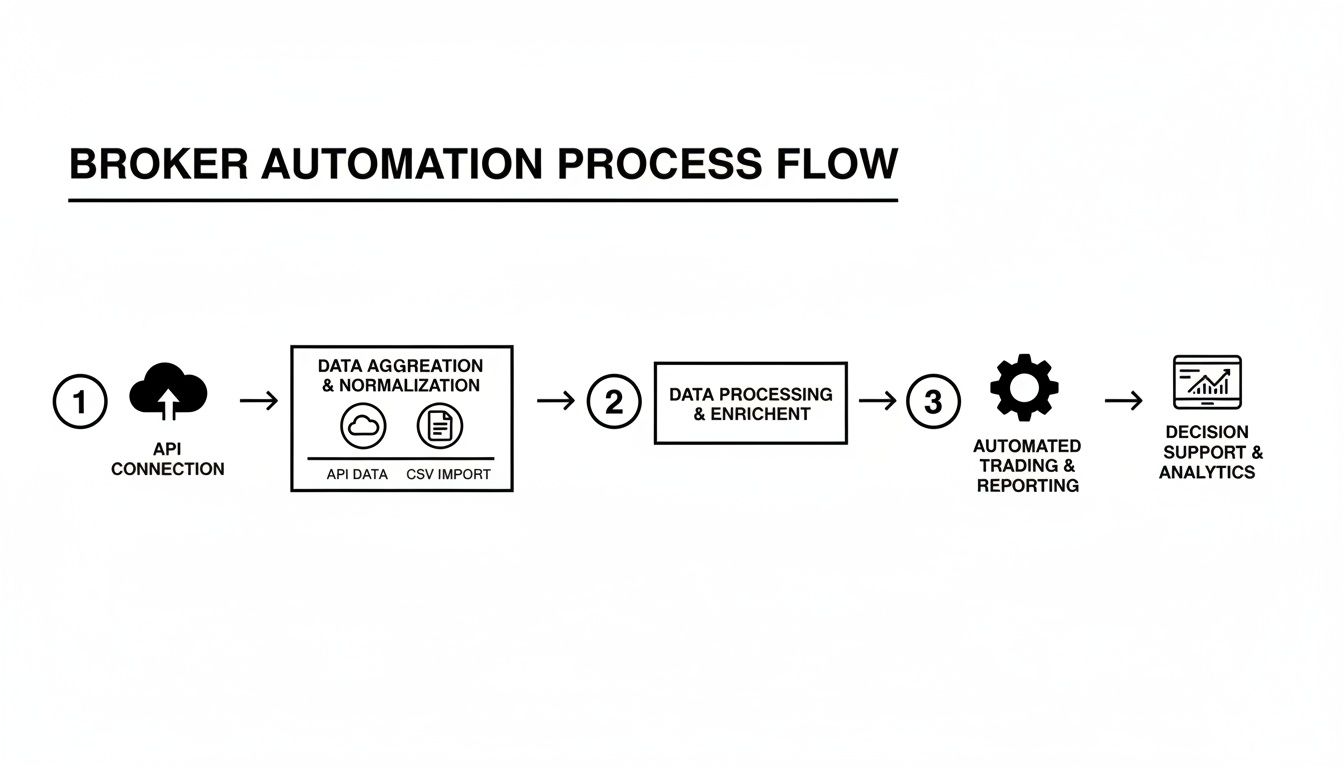
As you can see, the API is a direct pipeline. But if that’s not available, the CSV method is a perfectly reliable alternative.
When to Use a CSV Import
What happens if your broker isn’t on the supported API list? No problem at all. The CSV import is your universal solution. It does require one manual step, but it’s an incredibly reliable way to log your data. After you do it once or twice, it becomes second nature.
This is all about building a good habit. Set a weekly reminder — say, every Friday afternoon — to export and upload your trades. This keeps your journal current so your weekend review is always based on a complete, accurate dataset.
The process is simple:
- Find Your Trade History: Log in to your broker’s website and navigate to the section for “Account History,” “Transactions,” or “Statements.”
- Set Your Date Range: Choose the period you want to export. To stay on top of it, exporting the last week’s activity is a great routine.
- Download the CSV: Look for an “Export” or “Download” button and make sure you select the CSV format.
- Upload to Your Journal: Jump back over to your journal’s import section, choose the CSV upload option, and drop in the file you just saved.
This manual approach gives you total control over what gets imported and when. It works with literally any broker out there, making it an essential tool for any serious trader.
Mapping Your Data for Flawless Imports
Getting your trades into the journal is just the first hurdle. What really unlocks powerful insights is making sure that data is clean and accurate. This is where the crucial step of data mapping comes into play, especially when you’re dealing with CSV files from your auto import broker setup.
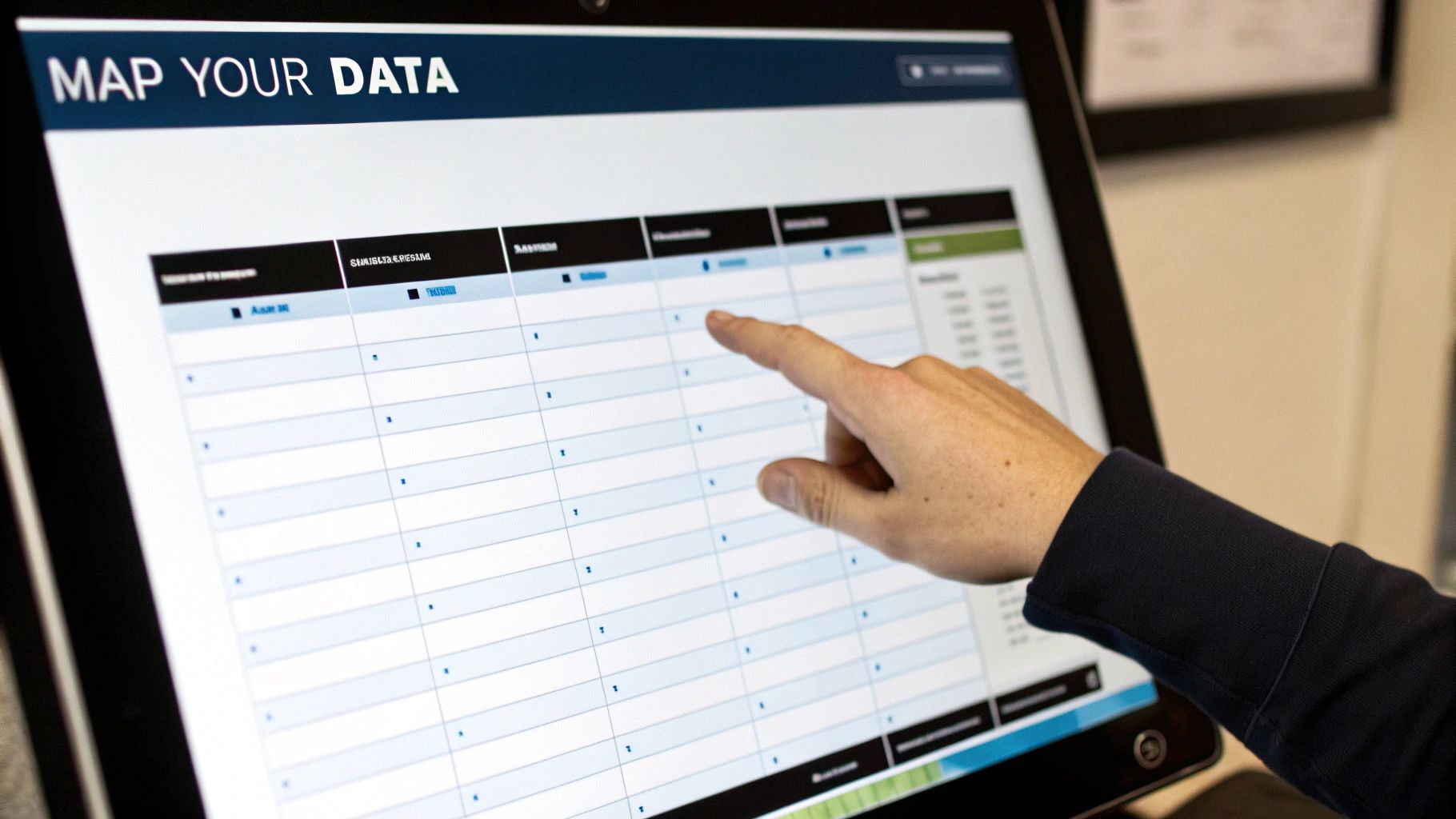
Here’s the problem: there’s no universal standard for how brokers label their data. One platform might use ‘Symbol’ while another prefers ‘Ticker.’ Your execution time could be under ‘Timestamp’ or ‘Trade Date/Time.’ This is a common headache for traders, but it’s easily solved by spending a few minutes mapping your broker’s columns to the fields inside your journal.
Think of it as giving your journal a translation key. You’re simply telling it, “When you see a column named ‘Symbol’ in this file, I want you to treat it as the ‘Ticker’.”
Why Correct Mapping Is Non-Negotiable
Failing to map your data correctly can quietly sabotage your entire performance analysis. It’s the classic “garbage in, garbage out” scenario. A small mistake here can lead to wildly inaccurate metrics, causing you to draw the completely wrong conclusions about your strategy.
Investing 10 minutes to properly set up your data mapping will save you countless hours of manual corrections and prevent you from making trading decisions based on flawed analytics. It’s one of the highest-leverage activities in your journaling routine.
Common Mapping Challenges and How to Solve Them
Let’s walk through some real-world examples. Imagine your broker’s CSV has these columns: Ticker, Transaction Type, Exec Time, Qty, Price, and Fees. Your journal needs to know how to interpret each one.
During the import process, you’ll usually find a simple interface where you match your file’s columns to the journal’s fields. It’s pretty straightforward:
-
Broker Column
Ticker→ Journal FieldSymbol -
Broker Column
Transaction Type→ Journal FieldSide(mapping ‘Buy’ to ‘Long’ and ‘Sell’ to ‘Short’) -
Broker Column
Exec Time→ Journal FieldExecution Time -
Broker Column
Qty→ Journal FieldQuantity -
Broker Column
Price→ Journal FieldAverage Price -
Broker Column
Fees→ Journal FieldCommissions
But what about more complex instruments? For options trades, you’ll need to map extra fields like Strike Price, Expiration Date, and Option Type (Call/Put). For futures, you’ll need the Contract Name. The key is to be meticulous during this initial setup. The good news? Once you save a mapping template for a specific broker, you won’t have to do it again.
This detailed data provides the raw material needed for much deeper analysis. If you’re looking to turn that raw data into actionable insights, a great next step is learning how to build a pivot table to really slice and dice your performance metrics.
Prioritizing Security and Data Privacy
Handing over access to any financial account is a big deal. It’s completely natural — and smart — to be a little skeptical. We’ve all heard the horror stories, and the last thing you want to do is put your brokerage account at risk.
The key is to understand the huge difference between sharing your password and using a modern, secure connection like OAuth. You should never, ever share your login credentials with anyone or any application. Legitimate journaling platforms will never ask for them. Instead, they use a secure handshake where your broker confirms it’s you and asks you to grant specific, limited permissions.
The Power of Read-Only Access
When you authorize a connection, you’re not handing over the keys to the castle. You’re giving the journaling software a very specific, limited pass — think of it as a read-only permission slip.
This means the application can look at your trading history, but it can’t touch anything else.
- It cannot execute trades on your behalf.
- It cannot withdraw or deposit funds.
- It cannot see or store your broker password.
It’s like giving a guest a temporary Wi-Fi password. They can get online, but they can’t rummage through your computer’s files or change your network settings. This secure, limited access is the bedrock of a trustworthy auto import broker connection.
The market is volatile enough; your tools need to be a source of stability. Just look at recent cross-border automotive trade, where Mexican auto exports to the U.S. dropped by 13.7% in January 2024 due to policy shifts, right after hitting record surplus levels. You can read more about how market dynamics impact trade on chrobinson.com. Your financial tools should be a source of security, not another variable to worry about.
Essential Security Habits for Every Trader
While modern connection protocols provide a strong first line of defense, your personal security habits are the final lock on the door. True discipline isn’t just about sticking to your trading plan; it’s about diligently protecting your assets online.
Your trading capital is your lifeblood. Protecting it starts with fundamental digital security practices that are non-negotiable in today’s environment.
Make these practices second nature:
- Enable Two-Factor Authentication (2FA): Switch this on for both your brokerage account and your journaling platform. It adds a critical layer of security by requiring a code from your phone to log in, stopping unauthorized access cold.
- Periodically Review App Permissions: Once or twice a year, make it a habit to log into your broker and check which third-party apps have access. If you’re not using a service anymore, revoke its access. It’s simple digital housekeeping.
- Use a Unique, Strong Password: Never, ever reuse passwords, especially for financial accounts. Get a good password manager to create and store complex, unique passwords for every site you use. It’s one of the easiest and most effective security upgrades you can make.
Common Questions About Auto Import Broker Connections
Stepping into automation can feel like a big leap, so it’s completely normal to have a few questions when you start connecting financial accounts. Most concerns are pretty common and easy to sort out. Here are some of the most frequent questions traders ask when setting up an auto import broker connection.
What Should I Do If My Broker Is Not Listed?
Don’t see your broker on the list for a direct API hookup? No problem. The CSV import method is your go-to solution, and it’s incredibly reliable. Just about every brokerage platform out there lets you download your full trade history as a CSV file.
Sure, it adds one manual step to your routine, but it’s a rock-solid way to get your data into the journal. The key is to build a small habit. Set a recurring reminder — maybe every Friday afternoon — to download the latest file and upload it. A simple weekly habit like this keeps your journal current and your analysis sharp.
How Are Complex Trades Like Options Spreads Handled?
Modern trading journals are built for this. They’re smart enough to understand multi-leg strategies right out of the box. When you import your trades, whether through a direct API or a clean CSV file, the system is designed to recognize and group the different legs of a single complex trade, like a vertical spread or an iron condor.
If you’re using a CSV file, the trick is to make sure your export includes columns that spell out the details for each leg — strike price, expiration, and type (call/put). This gives the mapping tool all the information it needs to piece the entire trade back together for a precise analysis.
The connection you authorize with a trading journal is strictly read-only. It has no ability to execute trades, access funds, or see your login credentials. Its only job is to automate your journaling.
Can an Auto Import Broker Connection Place Trades for Me?
Absolutely not. This is one of the most fundamental security features of any reputable journaling platform. The connection is intentionally designed as a one-way street; it can only pull your trading history for analysis.
This “read-only” permission is non-negotiable. It ensures the platform has zero technical ability to interact with your trading account, execute orders, or touch your funds. Its only purpose is to take the tedious task of data entry off your plate. That’s it.
What Happens If a Sync Fails or Creates Duplicates?
Sync issues can pop up from time to time, often due to a brief hiccup with the broker’s API on their end. Good journaling platforms have safeguards built in to prevent duplicate entries. They do this by checking for unique transaction IDs, so if a trade is already logged, it simply gets skipped on the next sync.
If you accidentally create duplicates yourself — say, by uploading the same CSV file twice — most platforms have tools to quickly select and delete multiple entries at once. It’s always a good habit to give your latest import a quick once-over just to make sure everything looks right.
Ready to stop wasting time on manual data entry and start analyzing what truly matters? TradeReview offers seamless auto broker sync and powerful analytics to give you the edge you need. Start your free trading journal today!